Autor: Equipo Técnico de Meitec
Revisado por: Especialista en Productos de Pantallas LED
Categoría: Fundamentos del Producto
Última actualización: Septiembre de 2026
La frecuencia de actualización es una de las especificaciones más citadas en la ficha técnica de una pantalla LED. Valores como 1920Hz, 3840Hz y 7680Hz son comunes, pero el significado de estos números suele malinterpretarse.
Una frecuencia de actualización más alta puede mejorar la estabilidad de la imagen y el rendimiento de la cámara, pero no significa automáticamente que una pantalla LED tenga mejor calidad de imagen general que otra.
Para la mayoría de los proyectos, la pregunta práctica no es simplemente:
“¿Cuál es la frecuencia de actualización más alta disponible?”
Sino:
“¿Qué frecuencia de actualización requiere realmente esta aplicación?”
Esta guía explica cómo funciona la frecuencia de actualización en las pantallas LED, por qué es importante, en qué se diferencia de la frecuencia de cuadros y la tasa de escaneo, y cómo elegir una frecuencia de actualización adecuada para aplicaciones que van desde señalización comercial hasta transmisiones y eventos en vivo.
¿Qué significa la frecuencia de actualización en una pantalla LED?
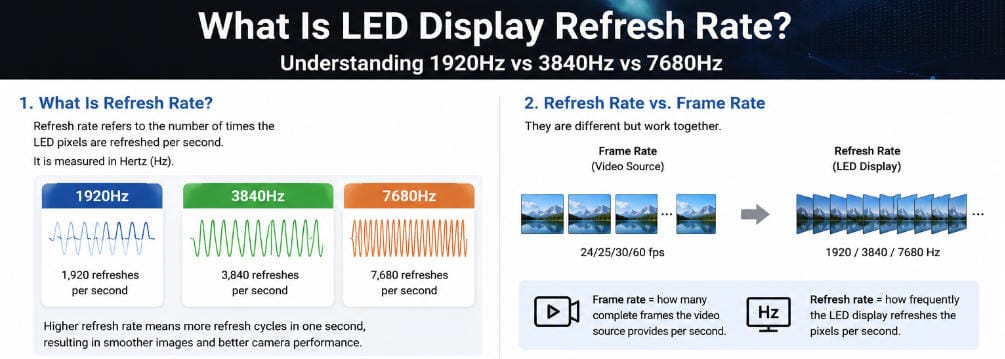
La frecuencia de actualización de una pantalla LED describe con qué frecuencia se accionan y actualizan los píxeles LED en un segundo.
Se mide en Hertzios (Hz).
Por ejemplo:
- 1920Hz significa que la pantalla completa aproximadamente 1.920 ciclos de actualización por segundo.
- 3840Hz significa aproximadamente 3.840 ciclos por segundo.
- 7680Hz significa aproximadamente 7.680 ciclos por segundo.
Estos números son mucho más altos que los valores de 50Hz, 60Hz o 120Hz comúnmente asociados con televisores convencionales y monitores de computadora, porque las pantallas LED de visión directa utilizan una arquitectura de accionamiento diferente.
Los píxeles LED individuales son controlados por circuitos integrados de accionamiento. En muchos sistemas de pantallas LED, los LED se encienden y apagan rápidamente mediante modulación por ancho de pulso y escaneo multiplexado. La conmutación ocurre demasiado rápido para que la visión humana normal perciba cada ciclo individual.
El resultado aparece ante el espectador como una imagen continua.
Sin embargo, las cámaras pueden detectar comportamientos de sincronización que el ojo humano no nota. Esta es una de las razones por las que la frecuencia de actualización se vuelve particularmente importante cuando una pantalla LED es filmada.
Frecuencia de actualización de pantalla LED vs. frecuencia de cuadros de video
La frecuencia de actualización no debe confundirse con la frecuencia de cuadros.
La frecuencia de cuadros describe cuántos cuadros de video completos están contenidos o son entregados por la fuente de video.
Las frecuencias de cuadros típicas incluyen:
- 24 fps para contenido cinematográfico
- 25 fps o 30 fps para video
- 50 fps o 60 fps para movimiento más fluido
- Frecuencias de cuadros más altas para ciertas aplicaciones deportivas, de juegos o de producción
Un video que se reproduce a 60 fps no significa que la pantalla LED funcione solo a 60Hz.
El procesador de video puede entregar 60 cuadros de imagen nuevos cada segundo, mientras que los módulos LED actualizan electrónicamente sus píxeles miles de veces durante el mismo período.
Una forma simplificada de entender la relación es:
Frecuencia de cuadros = con qué frecuencia llega nueva información de video.
Frecuencia de actualización = con qué frecuencia la pantalla LED reproduce esa información a través de su sistema de accionamiento.
Por lo tanto, aumentar la frecuencia de actualización del LED no crea cuadros adicionales que estén ausentes en el video original.
Un video de 30 fps sigue siendo un video de 30 fps incluso cuando se muestra en una pantalla LED de 7680Hz.
Esta distinción es importante porque los proveedores a veces colocan las especificaciones de frecuencia de cuadros y frecuencia de actualización juntas, aunque describen diferentes partes del sistema de pantalla.
Frecuencia de actualización vs. tasa de escaneo
Otra especificación que a menudo se confunde con la frecuencia de actualización es la tasa de escaneo, también llamada modo de escaneo.
Ejemplos incluyen:
- Escaneo 1/4
- Escaneo 1/8
- Escaneo 1/16
- Escaneo 1/32
- Escaneo 1/64
La relación de escaneo describe cómo se activan los grupos o filas de LED dentro del módulo.
En un sistema de escaneo 1/16, por ejemplo, solo una parte de las filas de LED se activa activamente en un momento dado. El controlador luego conmuta rápidamente entre diferentes grupos.
Este método de multiplexación ayuda a reducir el número de canales de controladores requeridos y se utiliza ampliamente en el diseño de pantallas LED.
La frecuencia de actualización y la tasa de escaneo interactúan entre sí, pero no son especificaciones intercambiables.
Dos pantallas LED pueden especificarse ambas a 3840Hz mientras utilizan diferentes arquitecturas de escaneo, circuitos integrados de controladores, diseños de PCB y configuraciones de control.
Esta es también la razón por la cual evaluar el rendimiento de una pantalla basándose en una sola especificación puede resultar engañoso.
¿Por qué es importante la frecuencia de actualización de las pantallas LED?
Para la visualización ordinaria, las pantallas LED profesionales modernas generalmente se actualizan con la suficiente rapidez como para que los espectadores no perciban un parpadeo evidente.
Las diferencias más importantes se vuelven visibles en condiciones exigentes.
1. Grabación con cámaras
La compatibilidad con cámaras es una de las razones más sólidas para especificar una frecuencia de actualización más alta en una pantalla LED.
Una persona frente a un muro LED puede ver una imagen perfectamente estable, mientras que una cámara registra:
- bandas horizontales oscuras;
- líneas de escaneo en movimiento;
- cambios parciales de brillo;
- parpadeo;
- exposición desigual.
Esto ocurre porque el obturador de la cámara y los ciclos de activación del LED pueden no estar sincronizados.
La cámara muestrea la pantalla durante ventanas de exposición muy cortas. Si esas ventanas de exposición interactúan deficientemente con el patrón de actualización del LED, las variaciones invisibles para el ojo humano pueden volverse visibles en la imagen grabada.
Una frecuencia de actualización más alta proporciona más ciclos de actualización dentro del período de exposición de la cámara y, en general, otorga al equipo de producción una mayor flexibilidad al seleccionar la velocidad de obturación y los ajustes de la cámara.
Sin embargo, una alta frecuencia de actualización por sí sola no garantiza un rendimiento perfecto con cámaras.
La calidad del circuito integrado del controlador, la implementación de la escala de grises, las características PWM, la configuración de escaneo, el ángulo del obturador de la cámara, la tasa de fotogramas y los ajustes del procesador LED también son relevantes.
Para proyectos profesionales de transmisión o producción virtual, una prueba real con cámara sigue siendo más valiosa que confiar únicamente en el número de frecuencia de actualización impreso en la hoja de especificaciones.
2. Eventos en vivo y pantallas escénicas
Conciertos, conferencias, exposiciones, lanzamientos de productos y eventos corporativos son frecuentemente fotografiados o filmados.
Esto hace que la frecuencia de actualización sea especialmente relevante para las pantallas LED de alquiler.
Un muro LED puede verse completamente normal para el público mientras produce líneas no deseadas en:
- transmisiones en vivo;
- cámaras de televisión;
- teléfonos inteligentes;
- fotografía de eventos;
- videos promocionales.
Para eventos donde la pantalla LED aparece regularmente detrás de artistas o oradores, 3840Hz se utiliza ampliamente como referencia profesional, mientras que configuraciones de mayor frecuencia de actualización pueden proporcionar flexibilidad adicional para entornos de producción más exigentes.
El requisito debe confirmarse según el sistema de cámaras real, en lugar de seleccionarse únicamente comparando números de especificaciones.
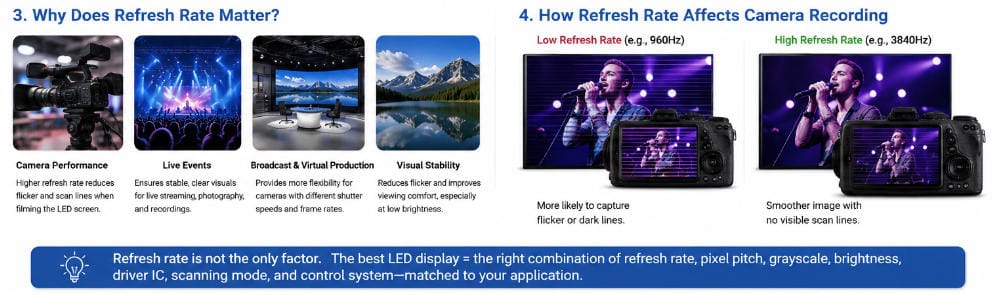
3. Estudios de transmisión y producción virtual
Los entornos de transmisión imponen requisitos significativamente más exigentes a las pantallas LED.
Las cámaras pueden utilizar diferentes velocidades de obturación, tasas de fotogramas, ajustes de exposición y sistemas de sincronización durante la producción.
La producción virtual introduce desafíos adicionales porque el muro LED puede convertirse en parte de la escena fotografiada, en lugar de servir simplemente como pantalla de fondo.
En estas aplicaciones, la frecuencia de actualización debe evaluarse junto con:
- ajustes del obturador de la cámara;
- sincronización genlock y sincronización general;
- comportamiento de escaneo;
- rendimiento de escala de grises;
- procesamiento de color.;
- latencia del procesador;
- rendimiento del IC del driver;
- brillo en el nivel de funcionamiento previsto.
Una especificación de 7680Hz puede ser útil para algunas aplicaciones de radiodifusión, pero el número en sí no demuestra que el sistema LED completo sea adecuado para producción virtual.
4. Estabilidad Visual a Largo Plazo
La frecuencia de actualización también puede afectar la estabilidad percibida de la pantalla.
Con frecuencias de actualización suficientemente bajas, los espectadores sensibles pueden notar parpadeo, particularmente en la visión periférica o cuando la pantalla opera con bajo brillo.
Las pantallas LED profesionales generalmente operan muy por encima de estos rangos problemáticos.
Para salas de reuniones, centros de control y otros entornos donde los usuarios pueden ver una pared LED de forma continua, la frecuencia de actualización debe considerarse junto con la escala de grises, el brillo, el contraste y la calidad de imagen a bajo brillo.
Por ejemplo, Meitec Pantalla LED Micro COB NOC Pro utiliza una configuración de 3840Hz para aplicaciones profesionales, incluyendo salas de control, entornos de visualización de datos y estudios de radiodifusión.
El punto importante no es que cada pantalla profesional de interior deba usar el mismo número. Es que la frecuencia de actualización debe coincidir con las condiciones de funcionamiento del sistema completo.
1920Hz vs. 3840Hz vs. 7680Hz
La siguiente comparación proporciona un punto de partida práctico.
| Frecuencia de actualización | Aplicación Típica | Consideración principal |
|---|---|---|
| 1920Hz | Señalización fija básica y aplicaciones sin cámaras | Generalmente suficiente cuando las pantallas se ven principalmente de forma directa |
| 3840 Hz | Pantallas comerciales, reuniones, eventos, salas de control y muchas aplicaciones filmadas | Equilibrio sólido entre el rendimiento de la cámara y los requisitos del sistema |
| 7680Hz | Alquiler de alta gama, radiodifusión y entornos exigentes con cámaras | Mayor flexibilidad para condiciones profesionales de filmación |
Estas categorías son pautas más que reglas universales.
1920Hz
Una pantalla LED de 1920Hz puede ser perfectamente adecuada para aplicaciones donde la pantalla es vista principalmente por personas en lugar de cámaras.
Los ejemplos pueden incluir:
- publicidad en carreteras;
- pantallas informativas de edificios;
- cierta señalización minorista;
- pantallas de información de transporte;
- instalaciones fijas básicas.
Si las cámaras rara vez interactúan con la pantalla, pagar por la frecuencia de actualización más alta posible puede proporcionar poco beneficio práctico.
Sin embargo, si la pantalla más adelante forma parte de una transmisión en vivo, producción televisiva o grabación de eventos, una configuración de menor frecuencia de actualización puede ofrecer menos flexibilidad.
3840 Hz
3840Hz se ha convertido en una especificación común para muchas aplicaciones profesionales de pantallas LED.
Puede proporcionar un equilibrio práctico para:
- salas de conferencias;
- pantallas corporativas;
- salas de control;
- instalaciones minoristas;
- exposiciones;
- escenarios de eventos;
- pantallas de alquiler;
- entornos donde las pantallas se fotografían o filman regularmente.
Meitec también ha utilizado una configuración de pantalla COB de 3840Hz en un proyecto real de videowall LED para sala de control, donde la visualización estable y la compatibilidad con cámaras formaban parte de los requisitos generales de la pantalla.
Nuevamente, la frecuencia de actualización es solo una parte del rendimiento del sistema. Para aplicaciones de uso continuo, la fiabilidad, la redundancia, la escala de grises, el consumo de energía y la estrategia de mantenimiento pueden ser igualmente importantes.
7680Hz
7680Hz generalmente se asocia con aplicaciones más exigentes orientadas a cámaras.
Los ejemplos potenciales incluyen:
- estudios de televisión;
- producciones premium de alquiler;
- eventos en vivo de alta gama;
- entornos de cámaras de alta velocidad;
- algunas instalaciones de producción virtual.
La capacidad adicional de actualización puede aumentar el margen operativo disponible para los equipos de cámara.
Pero no debe interpretarse como “el doble de calidad de imagen” que una pantalla LED de 3840Hz.
Los espectadores que miren directamente ambas pantallas en condiciones normales pueden notar poca o ninguna diferencia evidente.
El valor de 7680Hz se vuelve más relevante cuando la pared LED interactúa con equipos de imagen profesionales.
¿Es siempre mejor una frecuencia de actualización más alta?
No necesariamente.
La frecuencia de actualización es un parámetro de ingeniería, no una puntuación completa de calidad de imagen.
Aumentar el número no mejora automáticamente:
- la resolución;
- la densidad de píxeles;
- el brillo;
- la relación de contraste;
- la precisión del color;
- el ángulo de visión;
- la planitud del módulo;
- la calibración;
- la fiabilidad.
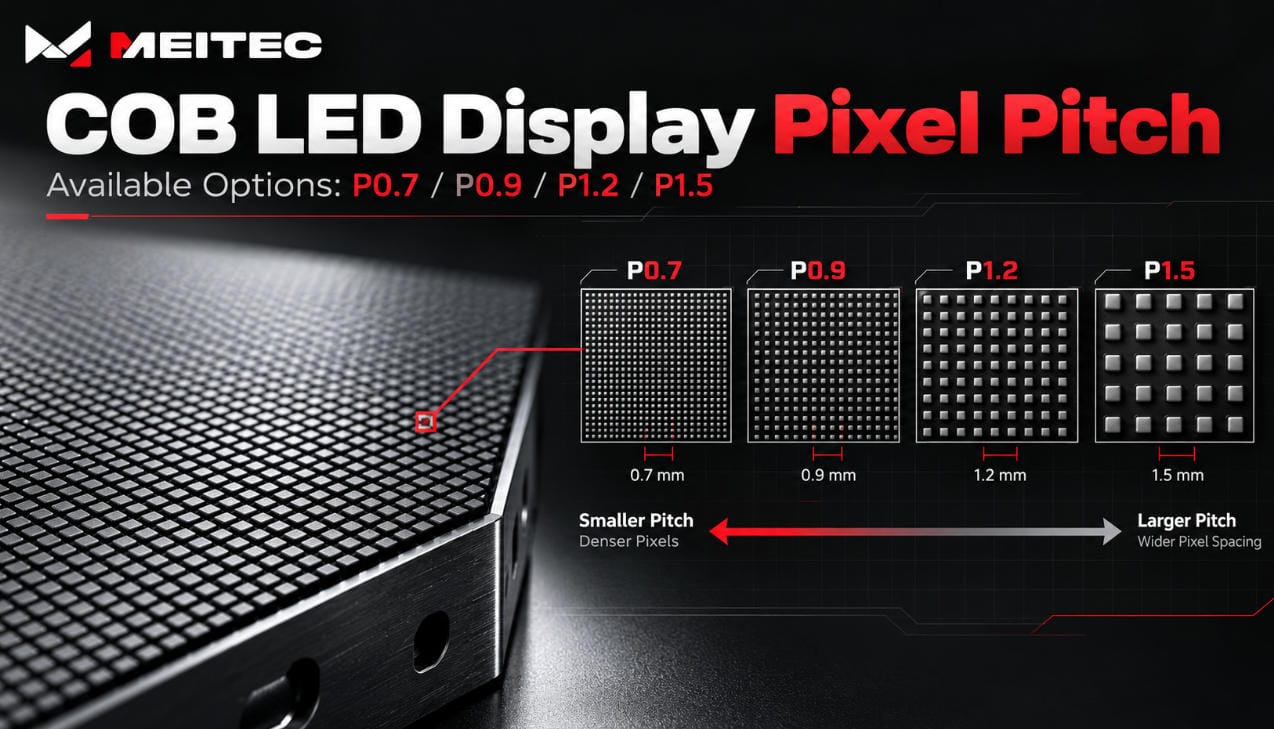
Por ejemplo, la densidad de píxeles está relacionada principalmente con el espaciado físico de los píxeles. Si necesita comprender esta relación, consulte la guía de Meitec sobre paso de píxeles en pantallas LED.
Una pantalla P2.5 que opera a 7680Hz no se vuelve repentinamente más nítida que una pantalla P1.25 que opera a 3840Hz.
Del mismo modo, una pantalla de alta frecuencia de actualización mal calibrada aún puede mostrar diferencias de color visibles entre módulos.
Una buena especificación equilibra múltiples parámetros en lugar de maximizar un solo número.
¿Afecta la frecuencia de actualización a la escala de grises?
La frecuencia de actualización y la escala de grises son especificaciones separadas, pero pueden influirse mutuamente porque ambas dependen del sistema de control LED.
La escala de grises describe cuántos niveles de brillo puede reproducir la pantalla entre el negro y la salida máxima.
Una mayor profundidad de escala de grises ayuda a crear transiciones más suaves en:
- degradados;
- sombras;
- tonos de piel;
- escenas oscuras;
- transiciones de bajo brillo.
Los circuitos integrados de control LED ajustan el brillo modificando el tiempo durante el cual los LED individuales permanecen iluminados en períodos de tiempo extremadamente cortos.
El tiempo disponible debe acomodar el escaneo, el control PWM, el procesamiento de escala de grises y el comportamiento de actualización.
Por lo tanto, un sistema de control bien diseñado debe lograr una alta frecuencia de actualización sin causar una pérdida inaceptable de detalle en bajo brillo o calidad de escala de grises.
Esta es una razón por la cual la evaluación profesional debe incluir el rendimiento real de la imagen en lugar de verificar únicamente si el proveedor indica “3840Hz” o “7680Hz”.”
¿Por qué una pantalla LED a veces muestra líneas en una cámara?
Las líneas horizontales oscuras no significan necesariamente que la pantalla LED esté defectuosa.
A menudo son causadas por una interacción entre:
- el tiempo de actualización del LED;
- el comportamiento PWM;
- la velocidad de obturación de la cámara;
- la velocidad de fotogramas de la cámara;
- la tasa de escaneo;
- los ajustes de brillo.
Imagine que una cámara expone su sensor mientras solo se ha completado parte de la secuencia de escaneo del LED.
El fotograma grabado puede capturar algunas filas en un estado de brillo y otras filas en otro.
El resultado puede aparecer como bandas oscuras o brillantes.
Cambiar la velocidad de obturación de la cámara puede reducir o eliminar el problema. Cambiar los parámetros del controlador LED también puede ayudar en algunos sistemas.
Esta es la razón por la cual los entornos de producción profesional deben probar el sistema LED final utilizando las cámaras y configuraciones de operación previstas.
¿Cómo debería elegir la frecuencia de actualización adecuada?
Comience con la aplicación en lugar de comenzar con el número más alto de la hoja de especificaciones.
Elija alrededor de 1920Hz cuando:
La pantalla se utiliza principalmente para visualización directa y la interacción con cámaras es limitada.
Los ejemplos típicos incluyen pantallas publicitarias y de información estándar donde la eficiencia de costos es más importante que el rendimiento de transmisión.
Elija alrededor de 3840Hz cuando:
La pantalla LED puede aparecer regularmente en cámaras o está instalada en un entorno interior profesional.
Este nivel es una opción práctica para muchas aplicaciones corporativas, de eventos, minoristas, de monitoreo y de presentaciones.
Considere 7680Hz cuando:
La pantalla está específicamente destinada a entornos exigentes de transmisión, alquiler premium, grabación de alta velocidad o producción.
En estos casos, la frecuencia de actualización debe probarse como parte de todo el flujo de trabajo de cámara a pantalla.
¿Qué deberían verificar los compradores además de la frecuencia de actualización?
Al comparar cotizaciones, no se detenga en el número mostrado junto a “Frecuencia de actualización”.”
Pregunte al proveedor:
¿La frecuencia de actualización indicada está disponible con los ajustes de escala de grises y brillo previstos?
Algunas características de rendimiento cambian según la configuración del controlador.
¿Qué circuito integrado de controlador se utiliza?
El circuito integrado del controlador tiene una influencia importante en el comportamiento PWM, el rendimiento de actualización y la calidad de imagen a bajo brillo.
¿Cuál es el modo de escaneo?
La frecuencia de actualización debe entenderse junto con la arquitectura de escaneo del módulo.
¿Puede el proveedor proporcionar una prueba con cámara?
Para aplicaciones de transmisión, alquiler o eventos, probar con configuraciones realistas de cámara es muy valioso.
¿Qué rendimiento de escala de grises se mantiene a bajo brillo?
Una pantalla de alta frecuencia de actualización que pierde detalles en sombras al atenuarse puede seguir teniendo un rendimiento deficiente en estudios o salas de control.
¿Puede reproducirse la configuración completa en producción?
Las especificaciones deben referirse al producto que realmente se entregará, no solo a un prototipo o una configuración opcional del controlador.
Malentendidos comunes sobre la frecuencia de actualización
“7680Hz debe verse el doble de fluido que 3840Hz.”
No necesariamente.
Bajo visualización directa normal, la mayoría de las personas no percibirán la diferencia de esta manera. El valor adicional está relacionado principalmente con la interacción con cámaras y las condiciones exigentes de producción.
“Una frecuencia de actualización más alta significa una resolución más alta.”
No.
La resolución está determinada por el número de píxeles físicos en la pantalla. La frecuencia de actualización describe con qué frecuencia se impulsan esos píxeles.
“Una alta frecuencia de actualización garantiza que no haya parpadeo en cámara.”
No.
Reduce el riesgo y proporciona mayor flexibilidad operativa, pero la configuración del obturador de la cámara, la velocidad de fotogramas, el comportamiento PWM y la sincronización también influyen en el resultado.
“Toda pantalla LED debería usar 7680Hz.”
No.
Una valla publicitaria vista desde una carretera y una pared LED utilizada dentro de un estudio de televisión tienen requisitos técnicos completamente diferentes.
Especificar la misma frecuencia de actualización para ambas puede agregar costos sin agregar rendimiento útil.
Principio final de selección
La frecuencia de actualización de la pantalla LED debe seleccionarse según cómo se utilizará realmente la pantalla.
Para señalización básica de visualización directa, una frecuencia de actualización moderada puede ser suficiente.
Para pantallas comerciales, salas de control y pantallas capturadas regularmente por cámaras, 3840Hz suele ser una especificación profesional sólida.
Para transmisión, alquiler de alta gama y otros entornos críticos con cámaras, frecuencias de actualización más altas como 7680Hz pueden proporcionar una flexibilidad adicional útil.
Pero la frecuencia de actualización nunca debe evaluarse de forma aislada.
Un sistema de pantalla LED confiable requiere la combinación correcta de:
- paso de píxel;
- frecuencia de actualización;
- escala de grises;
- el brillo;
- circuito integrado del controlador;
- arquitectura de escaneo;
- sistema de procesamiento;
- la calibración;
- configuración de control;
- pruebas específicas de la aplicación.
Por lo tanto, la mejor pantalla LED no es la que presenta el mayor número de frecuencia de actualización.
Es la pantalla cuyas características eléctricas, ópticas y de sistema de control están correctamente adaptadas al proyecto.
Preguntas frecuentes rápidas
¿Cuál es una buena frecuencia de actualización para una pantalla LED?
Para muchas pantallas LED profesionales, 3840Hz ofrece un equilibrio práctico entre estabilidad visual y rendimiento ante cámaras. Las aplicaciones con poca exposición a cámaras pueden utilizar frecuencias de actualización más bajas, mientras que los proyectos de transmisión y producción de alta gama pueden beneficiarse de 7680Hz o configuraciones especializadas.
¿Es suficiente 3840Hz para una pantalla LED?
Para muchas aplicaciones comerciales, corporativas, de salas de control, exposiciones y eventos, sí. Los proyectos críticos con cámaras deben probarse aún con el equipo de producción real.
¿Cuál es la diferencia entre 1920Hz y 3840Hz?
3840Hz actualiza el ciclo de conducción del LED con más frecuencia que 1920Hz. La principal ventaja práctica es una mayor flexibilidad cuando la pantalla es filmada, más que una duplicación de la resolución de imagen percibida.
¿Es 7680Hz mejor que 3840Hz?
Puede ser mejor para aplicaciones exigentes con cámaras, pero no es automáticamente necesario para proyectos normales de pantallas LED. Los requisitos de la aplicación deben determinar la especificación.
¿La frecuencia de actualización del LED afecta la resolución?
No. La frecuencia de actualización y la resolución son parámetros diferentes. La resolución depende del número físico de píxeles, mientras que la frecuencia de actualización describe con qué frecuencia se actualizan electrónicamente esos píxeles.