Автор: Техническая команда Meitec
Рецензент: Специалист по светодиодным дисплеям
Категория: Основы продукта
Дата последнего обновления: Сентябрь 2026 года
Шкала серого является одной из наиболее важных характеристик качества изображения светодиодного дисплея, но при этом она часто понимается неправильно.
Когда в спецификации светодиодного дисплея указано 14-битная шкала серого или 16-битная шкала серого, это число не описывает разрешение экрана, частоту обновления или максимальную яркость. Оно описывает, насколько точно система дисплея может управлять яркостью каждого красного, зеленого и синего светодиодного канала.
Более высокая способность шкалы серого позволяет светодиодному дисплею воспроизводить более тонкие различия яркости. При практическом просмотре это может обеспечить более плавные градиенты, лучшую детализацию теней, более естественные цветовые переходы и улучшенное качество изображения при низкой яркости.
Однако шкалу серого не следует оценивать как изолированное число. Дисплей с заявленной 16-битной шкалой серого не автоматически обеспечивает лучшее изображение, чем любой 14-битный дисплей. Характеристики драйверных микросхем, согласованность светодиодов, калибровка, частота обновления, настройки гаммы и управление яркостью — все это влияет на конечный результат.
Понимание этих взаимосвязей более полезно, чем простое сравнение наибольшего числа в техническом паспорте.
Что означает шкала серого в светодиодном дисплее?
В светодиодном дисплее шкала серого относится к количеству уровней яркости, которые каждый канал основного цвета может воспроизводить между минимальным и максимальным выходным значением.
Полноцветный светодиодный пиксель обычно содержит три канала основных цветов:
Красный
Зеленый
Синий
Каждый канал может работать на различных уровнях яркости. Комбинируя различные интенсивности красного, зеленого и синего, дисплей воспроизводит цвета, видимые на экране.
Таким образом, шкала серого не означает, что дисплей воспроизводит только оттенки серого. Она описывает разрешение яркости каждого RGB-канала.
Количество доступных уровней определяется битовой глубиной.
Основное соотношение выглядит следующим образом:
Уровни шкалы серого = 2ⁿ
где n представляет битовую глубину шкалы серого.
Например:
| Битовая глубина шкалы серого | Теоретические уровни на каждый RGB-канал |
|---|---|
| 8-бит | 256 |
| 10-бит | 1,024 |
| 12-бит | 4,096 |
| 14-бит | 16,384 |
| 16-бит | 65,536 |
Таким образом, 8-битная система может назначить одно из 256 значений яркости каждому красному, зеленому и синему каналу.
16-битная система теоретически может назначить одно из 65 536 значений яркости каждому каналу.
Поскольку RGB-каналы объединяются для создания конечного цвета, увеличение глубины шкалы серого значительно увеличивает количество возможных цветовых комбинаций.
Однако основное практическое преимущество заключается не просто в “большем количестве цветов”. Оно состоит в более точном управлении переходами между значениями яркости и цвета.
Почему шкала серого важна для качества изображения светодиодного дисплея?
Рассмотрим градиент, который постепенно изменяется от черного к темно-серому.
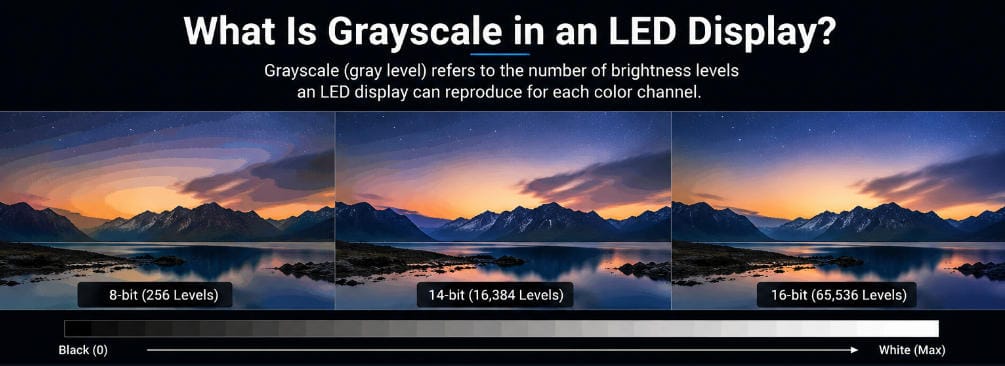
Если дисплей имеет относительно небольшое количество уровней яркости, ему может не хватить промежуточных значений для плавного воспроизведения перехода. Вместо непрерывного градиента могут появиться видимые ступени или полосы.
Это явление обычно называют бандингом или цветным бандингом.
Более высокая градация серого обеспечивает больше промежуточных значений яркости, уменьшая разницу между соседними уровнями.
Улучшение может быть особенно заметно в контенте, содержащем:
тёмные фоны;
оттенки кожи;
облака и небо;
тени;
дым или туман;
плавные световые переходы;
медицинские или аналитические изображения;
кинематографическое видео;
3D-рендеринг;
визуализацию данных.
Именно поэтому градация серого особенно важна для мелкошаговых indoor-светодиодных экранов, вещательных сред, диспетчерских и других применений, где зрители находятся близко к экрану и могут видеть тонкие различия изображения.
Например, профессиональные COB-светодиодные дисплеи обычно используются в приложениях с близким просмотром, где контраст, однородность уровня чёрного и тонкая детализация изображения имеют большее значение, чем на крупном наружном рекламном экране, просматриваемом с значительного расстояния.
Как светодиодный дисплей создаёт различные уровни градации серого?
Светодиоды ведут себя не совсем так, как традиционные лампы, которые можно плавно затемнять во всём рабочем диапазоне.
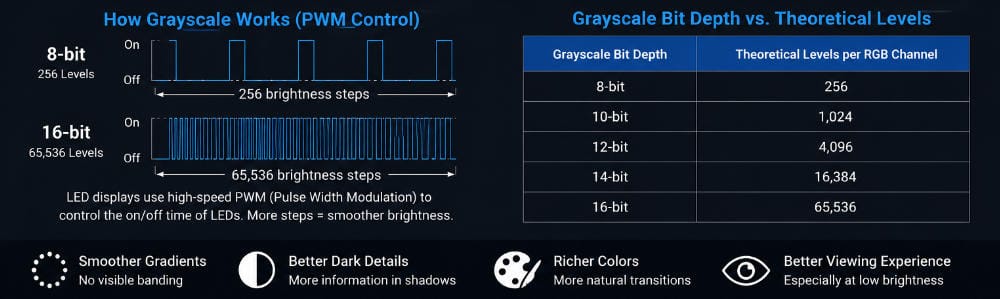
Современные светодиодные дисплейные системы обычно используют высокоскоростные электронные методы управления, такие как широтно-импульсная модуляция (ШИМ) для управления воспринимаемой яркостью.
При ШИМ светодиод включается и выключается чрезвычайно быстро.
Доля времени, в течение которого светодиод остаётся включённым в заданный период, определяет его воспринимаемую яркость.
Например, светодиод, который остаётся включённым в течение большей части цикла ШИМ, выглядит ярче, чем светодиод, включённый лишь на небольшую часть цикла.
Эти циклы переключения происходят достаточно быстро, чтобы человеческий глаз обычно не воспринимал отдельные импульсы. Вместо этого он видит кажущийся непрерывным уровень яркости.
Для формирования высокой глубины градации серого драйвер дисплея должен разделять доступный временной интервал на всё более мелкие отрезки.
Архитектура с 16-битной градацией серого, например, теоретически поддерживает 65 536 шагов яркости. Современные драйверные ИС для светодиодов могут поддерживать такой уровень ШИМ-управления градацией серого.
Это также объясняет, почему качество градации серого в значительной степени зависит от качества драйверной ИС и системы управления, а не только от самого светодиода.
8-битная, 14-битная и 16-битная градация серого
Разницу между уровнями градации серого лучше всего понять через практическое воспроизведение изображения, а не только через технические характеристики.
Система с 8-битной градацией серого обеспечивает 256 уровней яркости на каждый цветовой канал. Этого может быть достаточно для базовых цифровых изображений, но в тонких градиентах могут проявляться видимые переходы, особенно при обработке контента, снижении яркости или при близком расположении зрителей к дисплею.
A Система с 14-битной градацией обеспечивает 16 384 уровня на канал. Значительно меньшая разница между соседними шагами яркости позволяет добиться гораздо более плавных тональных переходов.
A Система с 16-битной градацией увеличивает теоретический диапазон до 65 536 уровней на канал. Это обеспечивает дополнительный контроль над тонкими различиями яркости и может быть особенно полезно для профессиональных приложений, связанных с тёмным контентом, высоким контрастом или точной визуализацией.
Серия Светодиодный дисплей NOC Pro Series COB Micro LED, например, указывает 16-битную градацию серого вместе с частотой обновления 3840 Гц. Такие характеристики особенно актуальны для диспетчерских, вещательных сред и систем визуализации с близким просмотром, где важны как тональное воспроизведение, так и стабильный вывод изображения.
Важный момент заключается в том, что битовая глубина представляет собой доступную точность управления, а не гарантию того, что каждый теоретический уровень будет одинаково различим в реальных условиях эксплуатации.
Разница между градацией серого и яркостью
Градация серого и максимальная яркость — это разные характеристики.
Яркость, обычно измеряемая в нитах или кд/м², описывает, сколько света может производить экран.
Градация серого описывает, насколько точно дисплей может разделить диапазон между минимальной и максимальной яркостью.
Например, два светодиодных дисплея могут оба обеспечивать максимальную яркость 1000 нит, но при этом иметь разные возможности обработки градаций серого.
Дисплей с более качественным управлением градациями серого способен воспроизводить меньшие различия между тёмными и светлыми участками, даже если его максимальная яркость не изменяется.
Это различие становится особенно важным, когда внутренний светодиодный экран эксплуатируется при яркости значительно ниже максимальной.
Экран, рассчитанный на 1000 нит, в конференц-зале или центре управления обычно используется при яркости всего 150–300 нит. Его способность сохранять плавные градиенты и точность цветопередачи после снижения яркости может иметь большее значение, чем сам показатель максимальной яркости.
Почему важна производительность на низких уровнях серого
Одним из наиболее сложных условий для светодиодного дисплея является воспроизведение очень тёмного контента при работе с низкой яркостью экрана.
При высокой яркости различия между соседними значениями градаций серого воспроизводятся относительно легче.
Однако при очень низких уровнях выходного сигнала электрические и временные различия между соседними значениями становятся чрезвычайно малыми.
Низкое качество воспроизведения градаций серого может привести к:
потере деталей в тенях;
неравномерности тёмных участков;
цветовым сдвигам;
видимой полосатости;
пятнистому фону;
неравномерной подсветке первого шага;
неестественным переходам от чёрного цвета.
Именно поэтому инженеры могут ссылаться на такие характеристики, как производительность на низких уровнях серого, градации серого при низкой яркости или равномерность на низких уровнях серого при оценке профессиональных светодиодных дисплеев.
Для таких применений, как центры управления, студии и премиальная внутренняя визуализация, эти характеристики могут быть более информативными, чем одна лишь максимальная яркость.
Серия Пример применения COB светодиодного дисплея в центре управления служит практической иллюстрацией. Кадры видеонаблюдения, затенённые карты, информационные панели и аналитическая графика содержат тонкие тональные различия, что делает воспроизведение градаций серого особенно актуальным для повседневной визуализации.
Как градации серого связаны с частотой обновления
Градации серого и частота обновления описывают разные аспекты производительности дисплея.
Глубина серого (градации серого) определяет количество доступных уровней яркости.
Частоту обновления описывает, как часто светодиодный дисплей обновляет вывод изображения, обычно выражается в герцах.
Однако эти два параметра не являются полностью независимыми внутри системы управления светодиодами.
Оба зависят от синхронизации драйверных микросхем, архитектуры сканирования и обработки ШИМ. Формирование большего количества уровней градаций серого требует всё более точной синхронизации, тогда как поддержание высокой частоты обновления также требует, чтобы дисплей быстро выполнял операции управления.
Современные драйверные микросхемы и системы управления разработаны для балансировки этих требований, поэтому профессиональные светодиодные дисплеи могут обеспечивать как высокую глубину градаций серого, так и частоту обновления, например 3840 Гц.
При сравнении продукции покупателям следует избегать предположения, что какой-либо один параметр сам по себе определяет качество изображения.
Более объективная оценка учитывает совместно градации серого, частоту обновления, коэффициент сканирования, драйверную микросхему, диапазон яркости и фактическое визуальное качество.
Градации серого — это не то же самое, что коэффициент контрастности
Градации серого иногда также путают с коэффициентом контрастности.
Коэффициент контрастности описывает разницу между самым ярким белым и самым тёмным чёрным, которые способен воспроизвести дисплей.
Градации серого описывают, сколько промежуточных значений яркости теоретически может существовать между этими крайними точками.
Таким образом, дисплей может иметь отличную обработку градаций серого, но относительно слабую передачу чёрного цвета, если физическая поверхность экрана отражает большое количество окружающего света.
И наоборот, экран с очень тёмной поверхностью может обеспечивать высокую контрастность, но при этом демонстрировать полосатость, если обработка градаций серого выполнена плохо.
Наилучшее визуальное качество требует как соответствующей контрастности, так и точного тонального контроля.
Это одна из причин, по которой технология COB может быть привлекательной для премиальных внутренних дисплеев. Обработка поверхности, уменьшенные зазоры между пикселями, однородность чёрного цвета и конструкция с малым шагом пикселей могут дополнять высокобитную обработку градаций серого, а не полагаться только на характеристики градаций серого.
Роль гаммы в воспроизведении градаций серого
Человеческое зрение не воспринимает яркость линейно.
Численное изменение от одного цифрового значения к другому не обязательно воспринимается глазом как одинаково значимое изменение яркости.
Поэтому в системах светодиодных дисплеев используется гамма-коррекция для преобразования входных значений изображения в выходную яркость таким образом, чтобы обеспечить более естественную визуальную реакцию.
Настройки гаммы влияют на то, как детали отображаются в тенях, средних тонах и светлых участках.
При неправильной настройке гаммы светодиодный дисплей с высокой способностью к градациям серого может всё равно выглядеть слишком тёмным, выцветшим или неестественным.
Например, агрессивная обработка гаммы может подавлять детали в тенях, тогда как некорректные настройки могут делать тёмные участки излишне светлыми и снижать воспринимаемую контрастность.
Глубина серой шкалы в битах определяет количество доступных уровней. Гамма помогает определить, как эти уровни распределяются визуально..
Поэтому профессиональная калибровка светодиодных дисплеев должна учитывать оба параметра.
Означает ли 16-битная серая шкала всегда лучшее качество изображения?
Не обязательно.
Характеристика 16-бит описывает теоретическую способность системы к обработке или управлению. Реальное качество изображения зависит от того, может ли весь дисплей эффективно использовать эту возможность.
Имеют значение и несколько других факторов.
Драйверный чип должен обеспечивать точный контроль выходного сигнала. Светодиодные чипы должны реагировать согласованно. Модули должны быть откалиброваны так, чтобы эквивалентные входные значения давали одинаковую яркость и цвет по всему экрану. Система управления должна корректно обрабатывать исходный сигнал. Настройки гаммы и яркости также должны соответствовать условиям просмотра.
Это означает, что два светодиодных дисплея с одинаковой характеристикой “16-битная серая шкала” всё равно могут давать визуально различные результаты.
Для серьёзных проектов характеристики следует рассматривать как отправную точку оценки, а не как окончательное решение.
Как оценить серую шкалу перед выбором светодиодного дисплея
Полезный тест серой шкалы не требует сложного контента.
Отобразите плавные градиенты от чёрного к белому, а также через основные и вторичные цвета. Обратите внимание, остаётся ли переход непрерывным или распадается на видимые полосы.
Затем снизьте яркость экрана до уровня, который, вероятно, будет использоваться в реальном проекте.
Тестирование при низкой яркости важно, поскольку некоторые проблемы становятся гораздо более заметными при затемнении дисплея.
Уделите особое внимание контенту, близкому к чёрному. Проверьте, остаются ли тёмные детали видимыми, ведут ли себя разные модули согласованно и сохраняют ли цвета нейтральность при приближении яркости к чёрному.
Также следует тестировать реальное видео. Лица, тёмные сцены, облака, туман, студийные фоны и постепенные световые эффекты могут выявить проблемы, которые менее заметны при статических тестах характеристик.
Для вещательных или камерных применений дисплей дополнительно следует тестировать через реальную камерную систему, поскольку настройки затвора, частота обновления и поведение управления светодиодами могут влиять на записанное изображение иначе, чем при непосредственном просмотре человеком.
Какой уровень серой шкалы следует выбрать?
Не существует единого значения серой шкалы, которое должно использоваться во всех проектах светодиодных дисплеев.
Крупные наружные рекламные дисплеи, просматриваемые с большого расстояния, имеют иные требования, чем вещательные студии или дисплеи для диспетчерских с шагом P0.9.
Для обычных коммерческих установок современная высококачественная обработка обычно обеспечивает большие возможности серой шкалы, чем старые 8-битные системы, и достаточна для обычной рекламы, презентаций и видеовоспроизведения.
Более продвинутая обработка с 14-битной и 16-битной серой шкалой становится всё более ценной, когда проект требует тонких градиентов, работы при низкой яркости, просмотра с близкого расстояния, профессионального видео, детализированной визуализации или точного воспроизведения тёмного контента.
Вместо вопроса только “Является ли экран 16-битным?” более полезным будет вопрос:
Насколько хорошо дисплей сохраняет серую шкалу, цветовую согласованность и детали в тенях при том уровне яркости, на котором он будет фактически работать?
Этот вопрос связывает характеристики с реальными условиями просмотра.
Итоговый вывод
Серая шкала в светодиодном дисплее описывает, насколько точно система может управлять яркостью каждого красного, зелёного и синего канала.
Большая битовая глубина обеспечивает больше теоретических шагов яркости:
8-бит обеспечивает 256 уровней, 14-бит — 16 384 уровня, а 16-бит — 65 536 уровней на канал.
Большее количество уровней может способствовать более плавным градиентам, более тонким цветовым переходам и лучшему воспроизведению тёмных деталей изображения.
Но серую шкалу никогда не следует оценивать только по битовой глубине.
Производительность драйверных чипов, ШИМ-управление, обработка гаммы, настройки яркости, калибровка, согласованность светодиодов, частота обновления, контрастность и физическая структура дисплея — всё это влияет на изображение, которое фактически видят зрители.
Поэтому для выбора светодиодного дисплея наиболее надёжным подходом является сочетание анализа характеристик с визуальным тестированием в реалистичных условиях эксплуатации.
Качественный светодиодный дисплей — это не просто тот, у которого указано высокое значение серой шкалы. Это тот, который способен поддерживать плавное, согласованное и точное тональное воспроизведение по всему экрану — в том числе когда контент тёмный, а дисплей работает при низкой яркости.