Author: Meitec Technical Team
Reviewed by: LED Display Product Specialist
Category: Product Basics
Last Updated: October 2026
LED display flickering is an unstable change in brightness that may appear across the entire screen, in individual cabinets, on specific LED modules, or only when the display is recorded by a camera.
The important point is that “flickering” does not describe a single fault.
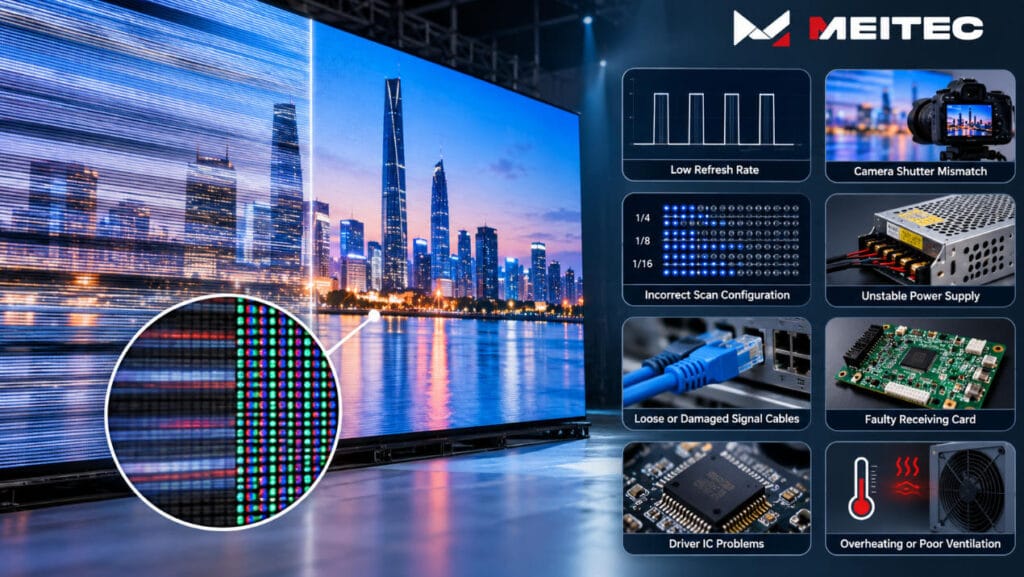
An LED screen may flicker because of unstable power, incorrect receiving-card parameters, poor signal transmission, low refresh performance, scan configuration, damaged driver ICs, loose connections, or camera shutter interaction.
The correct troubleshooting method therefore starts by identifying where, when, and how the flicker occurs.
This guide explains the main causes of LED display flickering, how to distinguish camera flicker from an actual screen fault, and how technicians can systematically locate the source of the problem.
What Does LED Display Flickering Look Like?
LED display flickering can appear in several forms:
- The entire screen repeatedly becomes brighter and darker
- One cabinet flashes intermittently
- Several modules blink at the same time
- Horizontal lines move through the image
- Part of the display briefly becomes black
- The screen appears stable to the eye but flickers on camera
- Flicker appears only at low brightness
- Random pixels or rows flash during operation
These symptoms may look similar, but their causes can be very different.
For example, an entire LED wall changing brightness simultaneously is more likely to involve the power system, controller, video source, or global configuration.
If only one cabinet flickers, the problem is more likely to be located in that cabinet’s power supply, receiving card, hub board, signal cable, or module connection.
This distinction should be made before replacing components.
1. Low LED Display Refresh Rate
Refresh rate is one of the most common factors associated with visible or camera-recorded flicker.
An LED display does not illuminate its LEDs continuously in the same way as a static light source. Driver ICs rapidly switch LEDs on and off while reproducing brightness and grayscale information.
The frequency of this electronic refreshing is described as the LED display refresh rate.
Typical specifications include:
- 1920Hz
- 3840Hz
- 7680Hz
At an appropriate refresh rate, the switching happens fast enough that the human eye normally perceives a stable image.
At lower refresh rates, flicker may become more noticeable, particularly:
- In peripheral vision
- At reduced screen brightness
- During fast eye movement
- When photographed
- When recorded with professional cameras
- During high-speed video recording
However, refresh rate should not be treated as the only explanation.
Two displays specified at 3840Hz can still behave differently because driver ICs, PWM implementation, scanning architecture, grayscale settings and controller configuration are also involved.
For a more detailed explanation of this parameter, see Meitec’s LED display refresh rate guide.
2. Camera Shutter and LED Refresh Timing Are Not Synchronized
Sometimes the LED display itself is operating correctly, but the camera records flickering, dark bands or moving lines.
This is not necessarily an LED screen failure.
A camera captures light during a limited exposure period. At the same time, the LED display is continuously scanning rows and generating PWM pulses.
When the camera shutter samples the display at an unfavorable point in this timing cycle, the camera may record different parts of the LED wall at different brightness states.
The result can include:
- Horizontal black bands
- Moving dark lines
- Bright bands
- Uneven exposure
- Partial-screen flicker
- Repeating rolling patterns
This situation is particularly common in:
- Television studios
- Concerts
- Livestreaming
- Conference stages
- Rental LED displays
- Virtual production
- Smartphone video
Increasing LED refresh rate can provide greater camera compatibility, but it does not guarantee that all flicker will disappear.
Camera shutter speed, frame rate, LED PWM frequency, scan architecture and synchronization should also be considered.
If the screen looks stable to the eye but only flickers on a camera, technicians should investigate the camera/display timing relationship before assuming that the LED modules are defective.
3. Incorrect LED Module Scan Configuration
Many LED displays use multiplexed scanning.
Instead of powering every LED row continuously, the driver circuit divides the LEDs into multiple scanning groups and activates them sequentially.
Common scan modes include:
- Static / 1/1
- 1/4 scan
- 1/8 scan
- 1/16 scan
- 1/32 scan
- 1/64 scan
The receiving-card configuration must match the actual electrical design of the LED module.
If the scan configuration is incorrect, the display may show:
- Flickering rows
- Repeated images
- Missing rows
- Incorrect brightness
- Abnormal colors
- Ghosting
- Unstable image patterns
Scan mode also interacts with refresh rate, PWM timing and grayscale.
Higher multiplexing ratios give the driver system shorter timing windows in which to complete row selection, data transfer, grayscale generation and LED current control.
This does not mean that a higher scan ratio automatically causes flicker. A properly designed fine-pitch LED display can operate very stably at a high multiplexing ratio.
The issue arises when the driver IC, configuration or timing settings do not correctly support the module architecture.
You can read Meitec’s LED display scan mode guide for a more detailed explanation of scan ratios.
4. Unstable or Failing LED Display Power Supply
LED modules, receiving cards and other internal electronics require stable DC power.
If the output voltage becomes unstable, parts of the screen may temporarily lose power or operate outside their intended voltage range.
Possible causes include:
- Aging power supplies
- Overloaded power supplies
- Loose AC input connections
- Loose DC terminals
- Poor-quality power cables
- Excessive voltage drop
- Incorrect power distribution
- Overheating
- Damaged connectors
Power-related flicker often affects an entire cabinet or a group of modules sharing the same power supply.
For example, if several adjacent modules begin flashing simultaneously while the rest of the screen remains normal, technicians should check whether those modules share the same power source.
Measurements should be performed under actual operating load rather than assuming that an unloaded power supply is functioning correctly.
A supply may provide acceptable voltage with little load but become unstable when the LED modules display bright content and current demand increases.
5. Loose or Damaged Signal Cables
LED display data passes through several stages before reaching the LED driver ICs.
A typical signal path may include:
Video source → video processor/controller → sending system → receiving card → hub board → LED module.
A poor connection anywhere in this chain can cause intermittent image instability.
Common causes include:
- Loose Ethernet cables
- Damaged RJ45 connectors
- Poor cable termination
- Loose ribbon cables
- Damaged HUB connections
- Oxidized connectors
- Excessive cable bending
- Faulty signal ports
Signal problems often produce irregular symptoms.
The screen may operate normally for several minutes and then suddenly flash, show corrupted content or lose part of the image.
Movement, vibration or temperature changes may make the fault appear and disappear.
A practical troubleshooting technique is to inspect the signal path in sequence rather than replacing several components simultaneously.
6. Faulty LED Display Receiving Card
The receiving card converts control-system data into signals that the LED modules can use.
If a receiving card becomes unstable, every module connected to that card may display abnormal behavior.
Possible symptoms include:
- One cabinet flickering
- A section of the display becoming black
- Incorrect colors
- Image freezing
- Intermittent flashing
- Abnormal module scanning
- Loss of synchronization
Before replacing the receiving card, technicians should first check:
- Power input
- Network cable
- HUB connection
- Configuration file
- Firmware compatibility
- Receiving-card parameters
If another known-good receiving card operates normally in the same cabinet with the same cables and modules, the original receiving card becomes a stronger suspect.
Troubleshooting by controlled component substitution is usually more reliable than changing several parameters at once.
7. Incorrect Receiving-Card or Control-System Parameters
Not every flickering problem is caused by failed hardware.
LED control systems contain configuration parameters that define how the receiving card communicates with the LED module.
These can include:
- Module width and height
- Scan mode
- Data group mapping
- RGB sequence
- Driver IC type
- Refresh configuration
- Clock parameters
- Blanking timing
- Grayscale settings
Loading the wrong receiving-card configuration file can therefore produce severe display abnormalities even when all hardware is functioning correctly.
This frequently occurs after:
- Replacing a receiving card
- Updating controller software
- Loading another project’s configuration
- Resetting receiving-card parameters
- Changing LED modules
- Performing system maintenance
A backup of the original working configuration should therefore be retained for professional LED installations.
8. Driver IC Problems
Driver ICs directly control the current supplied to the LEDs and manage important timing functions.
A damaged or unstable driver IC may cause:
- One row to flicker
- Several columns to flash
- Abnormal brightness
- Ghosting
- Color errors
- Intermittent pixels
- Part of a module to become unstable
Driver IC faults usually affect a relatively localized region rather than an entire LED wall.
Heat damage, electrical surges, component aging, PCB problems or manufacturing defects can contribute to driver failure.
If the same abnormal pattern remains after signal cables and receiving-card settings have been verified, the LED module itself should be tested.
9. Poor Electrical Grounding or Electromagnetic Interference
Large LED display systems contain switching power supplies, long cables, control electronics and high-current power distribution.
Poor grounding or electromagnetic interference can occasionally introduce unstable behavior into signal or power circuits.
Potential sources include:
- Improper electrical grounding
- Power cables installed too close to signal cables
- High-power motors
- Large transformers
- Stage lighting equipment
- Variable-frequency drives
- Radio-frequency equipment
Professional installations should separate signal and high-current power routing where appropriate and follow the electrical requirements of the control and power systems.
If flicker appears only when nearby electrical equipment starts operating, interference or grounding should be included in the investigation.
10. Overheating
LED displays generate heat through:
- LEDs
- Driver ICs
- Power supplies
- Receiving cards
- Internal electrical resistance
If heat cannot escape effectively, electronic components may become unstable.
Possible reasons include:
- Blocked ventilation
- Failed cooling fans
- Poor cabinet airflow
- Excessive ambient temperature
- Dust accumulation
- Operating at unnecessarily high brightness for long periods
Temperature-related faults may not appear immediately after startup.
The display can operate normally when cold and begin flickering after running for a period of time.
If this pattern occurs repeatedly, checking cabinet temperature and thermal conditions can help identify the cause.
11. Poor Calibration Is Usually Not the Cause of True Flicker
Calibration problems and flicker are sometimes confused.
Calibration corrects differences in pixel brightness and color output. Poor calibration may create:
- Bright or dark patches
- Visible cabinet boundaries
- Color differences
- Uneven white balance
These problems normally remain relatively static.
True flickering changes with time.
Therefore, recalibration should not be the first response to a screen that is flashing because of unstable power, damaged driver ICs or receiving-card faults.
Meitec’s LED display calibration guide explains what calibration can and cannot correct.
How to Troubleshoot LED Display Flickering
A systematic procedure can prevent unnecessary component replacement.
| Flicker Pattern | Areas to Check First |
|---|---|
| Entire LED wall flickers | Main power, controller, video source, global configuration |
| One cabinet flickers | Receiving card, cabinet power supply, Ethernet cable |
| Several modules flicker | Shared power supply, HUB board, module data cables |
| One module flickers | Ribbon cable, module connector, module PCB, driver IC |
| Individual rows flicker | Scan configuration, driver IC, module circuitry |
| Flicker only appears on camera | Refresh rate, PWM, scan mode, camera shutter |
| Flicker starts after warming up | Power supply, driver IC temperature, ventilation |
| Flicker began after configuration changes | Receiving-card parameters and configuration file |
The most effective rule is:
Change one variable at a time.
If power, receiving cards, cables, software settings and modules are all changed simultaneously, technicians may restore the screen without ever identifying the real problem.
That makes future faults more difficult to diagnose.
Can Higher Refresh Rate Completely Eliminate Flicker?
No.
A higher refresh rate can substantially improve image stability and camera compatibility, but LED display flicker is a system-level issue.
A professional display depends on the combined performance of:
- Driver IC
- Scan architecture
- PWM control
- Receiving card
- Power supply
- Signal transmission
- Controller configuration
- LED module design
- Camera settings
A 3840Hz or 7680Hz specification cannot compensate for an unstable power supply or damaged signal cable.
Likewise, replacing a power supply will not solve camera banding caused by an unsuitable shutter setting.
This is why technical diagnosis should be based on symptoms rather than on a single datasheet specification.
How Can LED Display Flickering Be Prevented?
Good system design and commissioning reduce the probability of flickering problems.
Important practices include:
- Use stable, correctly sized power supplies
- Maintain sufficient power-distribution capacity
- Use reliable signal cables and connectors
- Keep backup receiving-card configuration files
- Match scan settings to the actual module
- Specify appropriate refresh performance for camera applications
- Verify cooling and ventilation
- Perform cabinet-level testing before installation
- Inspect connectors during maintenance
- Test the complete display under realistic operating conditions
Procurement decisions also matter because an LED display is a complete system rather than only an LED module. Meitec’s LED display buying guide discusses why power supplies, receiving cards, control equipment and maintenance requirements should be evaluated together.
Final Troubleshooting Principle
LED display flickering should be treated as a symptom rather than a diagnosis.
Start by determining whether the problem affects:
- The entire display
- One cabinet
- Several modules
- One module
- Individual rows or pixels
- Only the camera image
This immediately narrows the possible causes.
Whole-screen flicker generally points toward upstream power, video or control-system problems.
Cabinet-level flicker suggests receiving-card, power or signal issues.
Module-level flicker is more likely to involve module connections, PCB circuitry or driver ICs.
Camera-only flicker should first be investigated as a timing interaction between the LED driving system and the camera.
A structured troubleshooting process is faster and more reliable than replacing components randomly.
The objective is not simply to make the screen stop flickering, but to identify whether the underlying problem is electrical, signal-related, configuration-related, thermal, optical or camera-related.
Quick FAQ
Why does my LED display flicker?
Common causes include unstable power supplies, incorrect refresh or scan settings, signal cable problems, faulty receiving cards, driver IC failures, incorrect configuration files and camera shutter interaction.
Why does my LED screen flicker only on camera?
The camera shutter may be interacting with the LED screen’s refresh, PWM and scanning cycles. The display can therefore look stable to the human eye while showing dark bands or flicker in recorded video.
Can a bad power supply cause an LED screen to flicker?
Yes. An unstable or overloaded power supply can cause modules or complete cabinets to flash, dim or temporarily lose power.
Does low refresh rate cause LED flicker?
It can. Lower refresh rates provide fewer electronic refresh cycles and may make flicker more visible, especially to cameras. However, refresh rate is only one factor.
Can a receiving card cause flickering?
Yes. A damaged receiving card, unstable power input, poor network connection or incorrect receiving-card parameters can cause all modules controlled by that card to flicker or behave abnormally.
Is LED screen flickering always a hardware problem?
No. Configuration errors, camera settings and incorrect control-system parameters can produce flickering even when the LED modules and other hardware are functioning correctly.