Author: Meitec Technical Team
Reviewed by: LED Display Product Specialist
Category: Product Basics
Last Updated: September 2026
Grayscale is one of the most important image-quality specifications of an LED display, but it is also frequently misunderstood.
When an LED display specification lists 14-bit grayscale or 16-bit grayscale, the number does not describe screen resolution, refresh rate or maximum brightness. It describes how precisely the display system can control the brightness of each red, green and blue LED channel.
Higher grayscale capability allows an LED display to reproduce finer brightness differences. In practical viewing, this can produce smoother gradients, better shadow detail, more natural color transitions and improved image quality at low brightness.
However, grayscale should not be evaluated as an isolated number. A display claiming 16-bit grayscale does not automatically produce better images than every 14-bit display. Driver IC performance, LED consistency, calibration, refresh rate, Gamma settings and brightness control all influence the final result.
Understanding these relationships is more useful than simply comparing the largest number on a specification sheet.
What Does Grayscale Mean in an LED Display?
In an LED display, grayscale refers to the number of brightness levels that each primary color channel can reproduce between minimum and maximum output.
A full-color LED pixel normally contains three primary color channels:
Red
Green
Blue
Each channel can operate at different brightness levels. By combining different intensities of red, green and blue, the display produces the colors visible on the screen.
Grayscale therefore does not mean that the display only produces shades of gray. It describes the brightness resolution of each RGB channel.
The number of available levels is determined by bit depth.
The basic relationship is:
Grayscale levels = 2ⁿ
where n represents the grayscale bit depth.
For example:
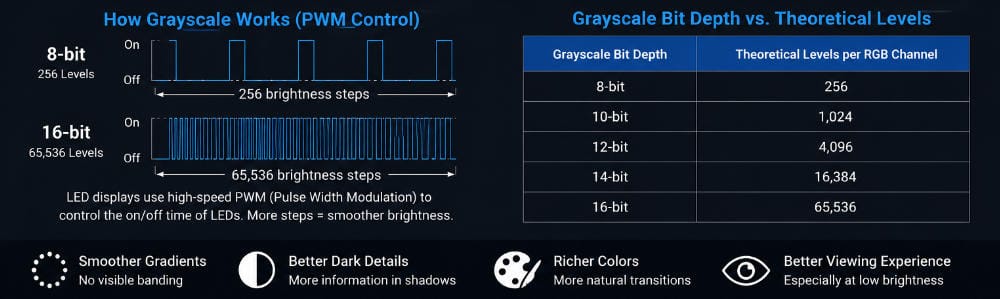
| Grayscale Bit Depth | Theoretical Levels per RGB Channel |
|---|---|
| 8-bit | 256 |
| 10-bit | 1,024 |
| 12-bit | 4,096 |
| 14-bit | 16,384 |
| 16-bit | 65,536 |
An 8-bit system can therefore assign one of 256 brightness values to each red, green and blue channel.
A 16-bit system can theoretically assign one of 65,536 brightness values to each channel.
Because RGB channels are combined to create a final color, increasing grayscale depth significantly increases the number of possible color combinations.
The main practical benefit, however, is not simply “more colors.” It is finer control over the transitions between brightness and color values.
Why Does Grayscale Matter for LED Image Quality?
Consider a gradient that gradually changes from black to dark gray.
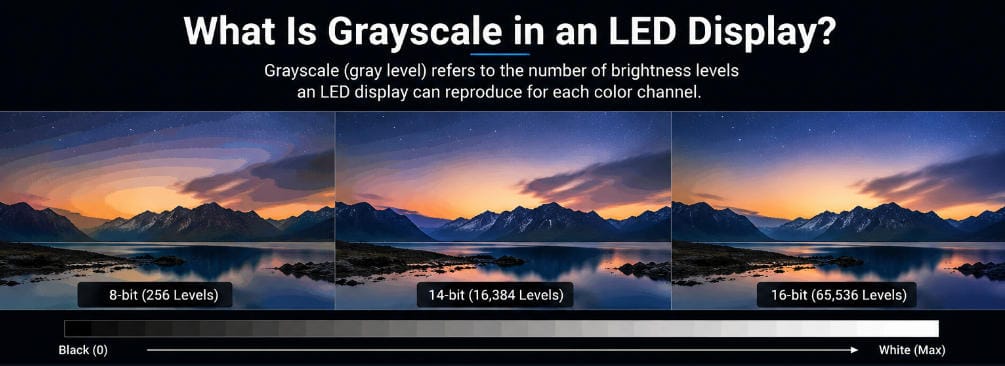
If a display has relatively few brightness levels, it may not have enough intermediate values to reproduce the transition smoothly. Instead of a continuous gradient, visible steps or bands may appear.
This phenomenon is commonly called banding or color banding.
Higher grayscale provides more intermediate brightness values, reducing the difference between neighboring levels.
The improvement can be particularly noticeable in content containing:
dark backgrounds;
skin tones;
clouds and skies;
shadows;
smoke or fog;
soft lighting transitions;
medical or analytical images;
cinematic video;
3D rendering;
data visualization.
This is why grayscale is particularly important for fine-pitch indoor LED displays, broadcast environments, control rooms and other applications where viewers are close to the screen and can see subtle image differences.
For example, professional COB LED displays are commonly used in close-viewing applications where contrast, black-level consistency and fine image detail matter more than they might on a large outdoor advertising screen viewed from a considerable distance.
How Does an LED Display Create Different Grayscale Levels?
LEDs do not behave exactly like traditional lamps that can simply be dimmed smoothly across their complete operating range.
Modern LED display systems typically use high-speed electronic driving methods such as Pulse Width Modulation (PWM) to control perceived brightness.
With PWM, the LED is switched on and off extremely quickly.
The proportion of time that the LED remains on during a given period determines its perceived brightness.
For example, an LED that remains on for a large portion of the PWM cycle appears brighter than an LED that is switched on for only a small portion of the cycle.
These switching cycles happen fast enough that the human eye normally does not perceive individual pulses. Instead, it sees an apparently continuous brightness level.
To generate high grayscale depth, the display driver must divide the available timing period into increasingly fine intervals.
A 16-bit grayscale architecture, for example, theoretically supports 65,536 brightness steps. Modern LED driver ICs can support this level of PWM grayscale control.
This also explains why grayscale performance depends heavily on the quality of the driver IC and control system rather than on the LED lamp alone.
8-Bit vs 14-Bit vs 16-Bit Grayscale
The difference between grayscale levels is best understood through practical image reproduction rather than specifications alone.
An 8-bit grayscale system provides 256 brightness levels per color channel. This may be adequate for basic digital imagery, but subtle gradients can reveal visible transitions, particularly when content is processed, brightness is reduced or viewers are close to the display.
A 14-bit system provides 16,384 levels per channel. The much smaller difference between neighboring brightness steps allows considerably smoother tonal transitions.
A 16-bit system increases the theoretical range to 65,536 levels per channel. This provides additional control over fine brightness differences and can be particularly useful for professional applications involving dark content, high contrast or precise visualization.
Meitec’s NOC Pro Series COB Micro LED display, for example, specifies 16-bit gray level together with a 3840Hz refresh rate. Such specifications are particularly relevant for control rooms, broadcast environments and close-viewing visualization systems where both tonal reproduction and stable image output are important.
The important point is that bit depth represents available control precision, not a guarantee that every theoretical level will be equally distinguishable in real operating conditions.
The Difference Between Grayscale and Brightness
Grayscale and maximum brightness are different specifications.
Brightness, normally measured in nits or cd/m², describes how much light the screen can produce.
Grayscale describes how finely the display can divide the range between minimum and maximum brightness.
For example, two LED displays may both produce 1,000 nits at maximum brightness while having different grayscale processing capabilities.
A display with better grayscale control can reproduce smaller differences between dark and bright areas even though its maximum brightness is unchanged.
This distinction becomes particularly important when an indoor LED wall is operated far below its maximum brightness.
A screen designed for 1,000 nits might normally be used at only 150–300 nits in a conference room or control center. Its ability to maintain smooth gradients and color accuracy after brightness reduction can matter more than the maximum brightness specification itself.
Why Low-Grayscale Performance Is Important
One of the more demanding conditions for an LED display is reproducing very dark content while operating at low screen brightness.
At high brightness, differences between neighboring grayscale values are relatively easier to reproduce.
At very low output levels, however, the electrical and timing differences between adjacent values become extremely small.
Poor low-grayscale performance can result in:
loss of shadow detail;
uneven dark areas;
color shifts;
visible banding;
mottled backgrounds;
inconsistent first-step illumination;
unnatural transitions from black.
This is why engineers may refer to characteristics such as low-gray performance, low-brightness grayscale or low-gray uniformity when evaluating professional LED displays.
For applications such as control rooms, studios and premium indoor visualization, these characteristics can be more informative than maximum brightness alone.
Meitec’s control room COB LED display case study provides a practical example. Surveillance footage, shaded maps, dashboards and analytical graphics contain subtle tonal differences, making grayscale reproduction particularly relevant to day-to-day visualization.
How Grayscale Relates to Refresh Rate
Grayscale and refresh rate describe different aspects of display performance.
Grayscale determines the number of brightness levels available.
Refresh rate describes how frequently the LED display refreshes its image output, normally expressed in hertz.
However, the two parameters are not completely independent inside the LED driving system.
Both depend on driver IC timing, scan architecture and PWM processing. Producing more grayscale levels requires increasingly precise timing, while maintaining a high refresh rate also requires the display to complete its driving operations rapidly.
Modern driver ICs and control systems are designed to balance these requirements, which is why professional LED displays can provide both high grayscale depth and refresh rates such as 3840Hz.
When comparing products, buyers should therefore avoid assuming that either parameter alone defines image quality.
A better evaluation considers grayscale, refresh rate, scan ratio, driver IC, brightness range and actual visual performance together.
Grayscale Is Not the Same as Contrast Ratio
Grayscale is also sometimes confused with contrast ratio.
Contrast ratio describes the difference between the brightest white and darkest black a display can reproduce.
Grayscale describes how many intermediate brightness values can theoretically exist between those endpoints.
A display can therefore have excellent grayscale processing but relatively weak black performance if the physical screen surface reflects a large amount of ambient light.
Conversely, a screen with a very dark surface may achieve strong contrast but still show banding if its grayscale processing is poor.
The best visual performance requires both appropriate contrast and accurate tonal control.
This is one reason why COB technology can be attractive for premium indoor displays. Surface treatment, reduced pixel gaps, black consistency and fine-pitch design can complement high-bit grayscale processing rather than relying on grayscale specifications alone.
The Role of Gamma in Grayscale Reproduction
Human vision does not perceive brightness linearly.
A numerical change from one digital value to another does not necessarily appear as an equally large brightness change to the eye.
LED display systems therefore use Gamma correction to map incoming image values to output brightness in a way that produces a more natural visual response.
Gamma settings affect how detail appears in shadows, midtones and highlights.
If Gamma is poorly configured, an LED display with high grayscale capability may still appear too dark, washed out or unnatural.
For example, aggressive Gamma processing can crush shadow details, while incorrect settings may make dark areas appear raised and reduce perceived contrast.
Grayscale bit depth determines how many levels are available. Gamma helps determine how those levels are distributed visually.
Professional LED display calibration must therefore consider both.
Does 16-Bit Grayscale Always Mean Better Image Quality?
Not necessarily.
A 16-bit specification describes the theoretical processing or driving capability of the system. Real-world image quality depends on whether the complete display can use that capability effectively.
Several other factors matter.
The driver IC must provide precise output control. LED chips must respond consistently. Modules should be calibrated so that equivalent input values produce similar brightness and color across the screen. The control system must process the source signal correctly. Gamma and brightness settings must also be appropriate for the viewing environment.
This means two LED displays that both list “16-bit grayscale” can still produce visibly different results.
For serious projects, specifications should therefore be treated as the beginning of the evaluation rather than the final decision.
How to Evaluate Grayscale Before Choosing an LED Display
A useful grayscale test does not require complicated content.
Display smooth gradients from black to white and through primary and secondary colors. Observe whether the transition remains continuous or breaks into visible bands.
Then reduce the screen brightness to the level likely to be used in the actual project.
Low-brightness testing is important because some problems become much more noticeable when the display is dimmed.
Pay particular attention to near-black content. Check whether dark details remain visible, whether different modules behave consistently and whether colors remain neutral as brightness approaches black.
Real video should also be tested. Faces, dark scenes, clouds, fog, studio backgrounds and gradual lighting effects can expose problems that are less obvious in static specification tests.
For broadcast or camera-facing applications, the display should additionally be tested through the actual camera system because shutter settings, refresh rate and LED driving behavior can affect recorded images differently from direct human viewing.
What Grayscale Level Should You Choose?
There is no single grayscale number that every LED display project must use.
Large outdoor advertising displays viewed from long distances have different requirements from broadcast studios or P0.9 control-room displays.
For conventional commercial installations, modern high-quality processing normally provides more grayscale capability than older 8-bit systems and is sufficient for normal advertising, presentations and video playback.
Higher-end 14-bit and 16-bit processing becomes increasingly valuable when the project requires fine gradients, low-brightness operation, close viewing, professional video, detailed visualization or accurate reproduction of dark content.
Instead of asking only, “Is the screen 16-bit?”, a more useful question is:
How well does the display preserve grayscale, color consistency and shadow detail at the brightness level at which it will actually operate?
That question connects the specification to real viewing conditions.
Final Takeaway
Grayscale in an LED display describes how precisely the system can control the brightness of each red, green and blue channel.
Higher bit depth provides more theoretical brightness steps:
8-bit provides 256 levels, 14-bit provides 16,384 levels, and 16-bit provides 65,536 levels per channel.
More levels can help produce smoother gradients, finer color transitions and better reproduction of dark image detail.
But grayscale should never be evaluated by bit depth alone.
Driver IC performance, PWM control, Gamma processing, brightness settings, calibration, LED consistency, refresh rate, contrast and the physical display structure all influence the image viewers actually see.
For LED display selection, the most reliable approach is therefore to combine specification review with visual testing under realistic operating conditions.
A high-quality LED display is not simply one that lists a high grayscale number. It is one that can maintain smooth, consistent and accurate tonal reproduction across the entire screen—including when the content is dark and the display is operating at low brightness.