Author: Meitec Technical Team
Reviewed by: LED Display Product Specialist
Category: Product Basics
Last Updated: September 2026
Color temperature is an important image-quality parameter of an LED display because it determines how the screen reproduces white and, indirectly, how the overall image feels to the viewer.
A white image on one LED screen may appear slightly yellow or warm, while another may look neutral white or slightly blue. These differences often come from different color-temperature settings, RGB balance, LED characteristics, calibration conditions, or operating brightness.
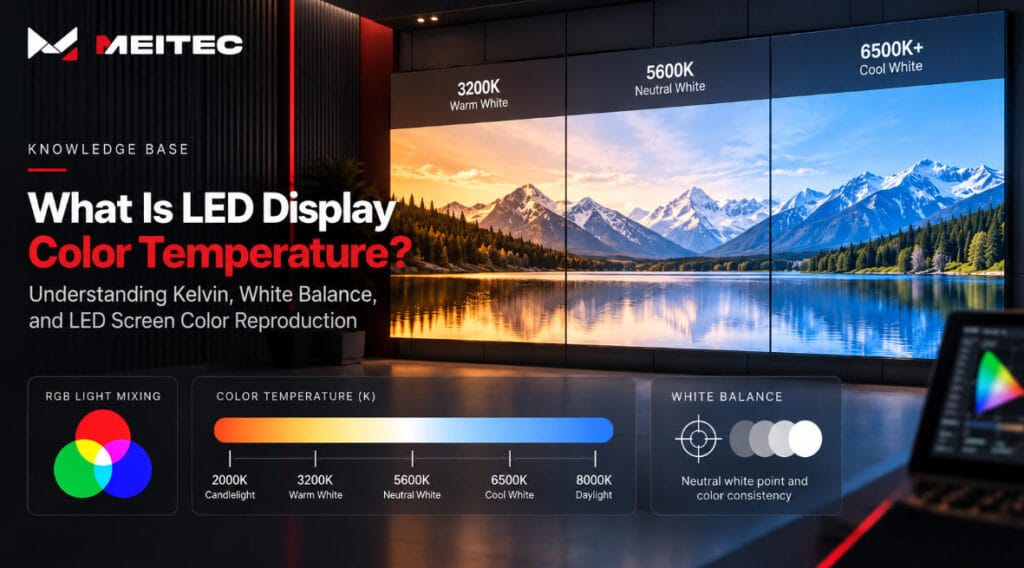
Color temperature is usually expressed in Kelvin (K). Common LED display settings include approximately 3200K, 5600K, and 6500K, although professional systems may allow the white point to be adjusted over a much wider range.
Understanding color temperature is especially important for indoor video walls, broadcast studios, control rooms, retail displays, event screens, and other applications where consistent color reproduction matters.
What Is Color Temperature?
Color temperature describes the visual appearance of white light.
It originates from the concept of a theoretical black-body radiator. As the temperature of this theoretical object increases, the color of the emitted light changes from reddish and warm to yellowish, white, and eventually bluish.
The temperature is expressed in Kelvin.
In practical display terminology:
| Color Temperature | General Appearance | Typical Description |
|---|---|---|
| 3000–3500K | Warm white | Yellowish or reddish white |
| 4000–4500K | Neutral-warm | Less yellow, relatively balanced |
| 5000–5600K | Daylight-like | Natural or neutral white |
| 6000–6500K | Cool white | Slightly bluish white |
| Above 7000K | Very cool white | Noticeably blue appearance |
These descriptions are approximate. Human perception also depends on ambient lighting, surrounding colors, screen brightness, and viewing conditions.
For an LED display, color temperature primarily describes the white point created when the red, green, and blue LEDs operate together.
How Does an LED Display Produce White?
A full-color LED display uses red, green, and blue subpixels.
Unlike a lamp that produces white light directly, the LED screen creates the perception of white by combining controlled amounts of red, green, and blue light.
If the three channels are not properly balanced, the resulting white point changes.
For example:
- Too much red can make white appear warmer.
- Too much blue can make white appear cooler.
- Excessive green can give neutral content a greenish tint.
- Differences between modules can make different parts of the same screen show different white tones.
Changing the relative output of the RGB channels therefore changes the display’s white point and its correlated color temperature.
The process is not simply a matter of increasing or decreasing one RGB channel arbitrarily. Professional display adjustment also considers chromaticity coordinates, LED characteristics, grayscale behavior, brightness limits, and the capabilities of the control system.
What Does 6500K Mean on an LED Display?
Around 6500K is a commonly used white-point target in professional digital display and video environments.
A properly adjusted 6500K white should appear relatively neutral under suitable viewing conditions. However, someone viewing the screen in a room illuminated by warm 3000K lighting may perceive that same white as somewhat cool.
This illustrates an important point:
Color temperature is not purely a subjective “warm versus cool” setting.
Professional display configuration normally works toward a measurable target white point. The surrounding environment then affects how that white is perceived by viewers.
For this reason, the appropriate color temperature should be chosen according to the application rather than assuming that one value is ideal for every LED installation.
Color Temperature vs. White Balance
Color temperature and white balance are closely related, but they should not always be treated as identical terms.
Color temperature describes the apparent warmth or coolness of a white point.
White balance describes the adjustment of the RGB channels so that the display produces the intended neutral white.
When technicians adjust an LED display toward a target such as 6500K, they are effectively changing the relationship between the red, green, and blue channels.
A good white balance should also remain reasonably consistent at different grayscale levels.
This is important because a display may look correct at full white but shift toward red, green, or blue when showing darker gray content.
Professional image quality therefore requires more than checking one full-white test pattern.
Color Temperature vs. Color Accuracy
A correct color temperature does not automatically mean that every color displayed on the screen is accurate.
A screen could reproduce a target white point correctly while still showing inaccuracies in saturated red, green, blue, cyan, magenta, or yellow.
Complete color performance may also depend on:
- LED wavelength consistency
- RGB primary coordinates
- grayscale processing
- gamma
- display calibration
- video processing
- color gamut
- driver IC performance
- content source
- operating brightness
Color temperature should therefore be considered one part of the complete color-management system.
This is also why professional LED display calibration measures and corrects brightness and color differences across pixels or modules instead of relying only on a visual white-balance adjustment.
How Is LED Display Color Temperature Measured?
Professional color-temperature measurement normally uses optical instruments rather than visual estimation.
Common tools include:
- colorimeters;
- spectroradiometers;
- professional display calibration cameras;
- integrated LED calibration systems.
The screen displays a known test pattern, often full white or a specified grayscale level. The measuring instrument then records the optical output.
Important measured values can include:
- luminance;
- chromaticity coordinates;
- correlated color temperature;
- RGB balance;
- color uniformity.
Technicians compare the measured result with the required target and adjust the display accordingly.
A human observer can detect large color differences, but visual adjustment alone is not sufficiently repeatable for precision applications because human perception adapts rapidly to surrounding light.
What Is Correlated Color Temperature?
LED displays do not behave exactly like theoretical black-body radiators. For this reason, the more technically accurate term is often correlated color temperature, or CCT.
CCT describes the temperature of the black-body color that most closely resembles the measured white light.
Two white points can have similar CCT values while still appearing slightly different if their chromaticity coordinates differ, particularly along the green–magenta direction.
This distinction becomes relevant in applications such as broadcast, virtual production, cinema-related environments, and high-end visualization systems.
For general LED-display specifications, however, manufacturers commonly use the shorter term “color temperature.”
How Color Temperature Relates to Grayscale
Color temperature should ideally remain stable as image brightness changes.
Consider a screen adjusted correctly to approximately 6500K at full white.
If the RGB channels do not track consistently at lower drive levels, the screen may produce:
- neutral white at high brightness;
- reddish gray at medium brightness;
- greenish shadows at low brightness.
This behavior affects gradients, skin tones, shadow detail, and other subtle image areas.
The ability to maintain stable RGB relationships across different intensity levels is therefore closely connected with grayscale performance.
You can read more about how brightness levels are generated in Meitec’s guide to grayscale in an LED display.
High grayscale capability alone does not guarantee perfect color temperature, but sufficient processing precision gives the display system more control over low-level tonal reproduction.
Does Brightness Affect Color Temperature?
It can.
LED output characteristics can change as drive current, PWM behavior, operating temperature, and brightness settings change.
A screen that has been optimized at high brightness may therefore behave differently when operated at a much lower brightness.
This is particularly important for indoor LED displays.
An indoor video wall may be capable of high luminance but normally operate at only a fraction of its maximum output. If RGB tracking becomes unstable when brightness is reduced, the white point may shift and dark images may lose color neutrality.
For this reason, brightness selection and color performance should be evaluated together.
Meitec’s guide on how to choose LED display brightness explains why realistic operating brightness is more useful than simply comparing maximum nit specifications.
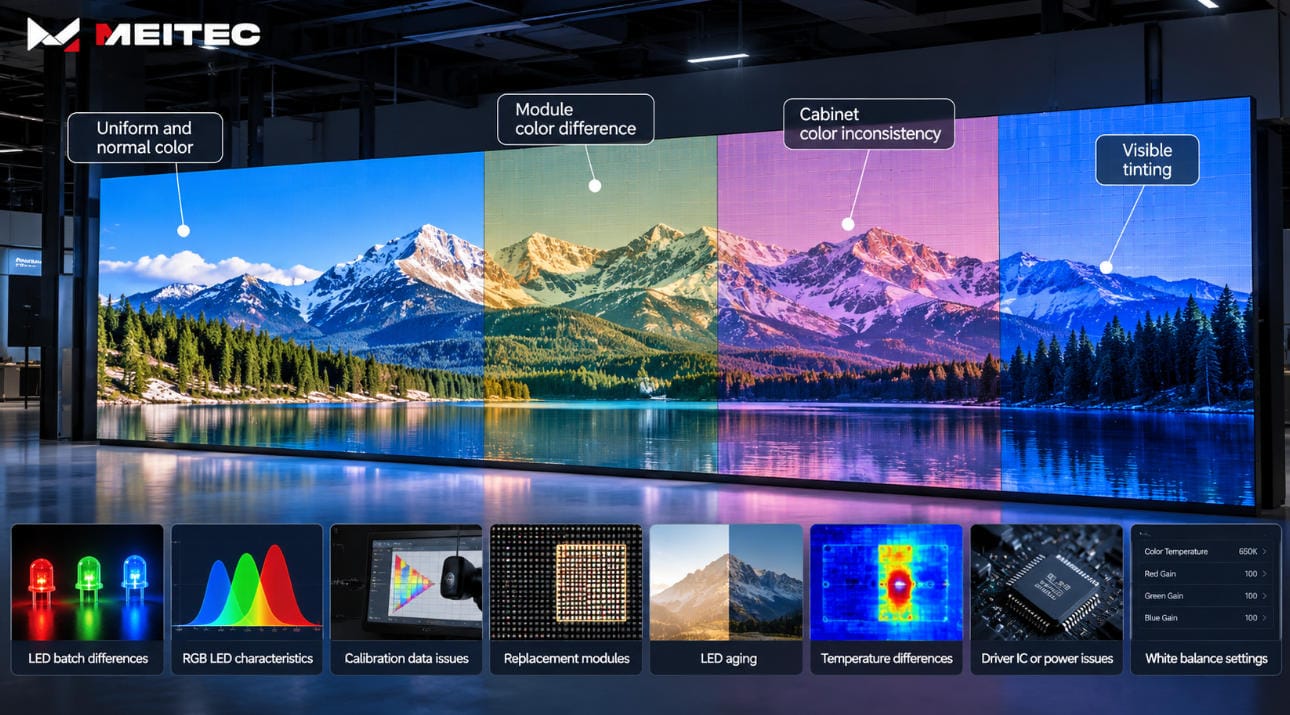
Why Can Different LED Cabinets Show Different Color Temperatures?
A large LED screen is assembled from many modules and cabinets.
Ideally, every part of the display should reproduce the same white point. In practice, small differences can appear because of:
- LED binning differences;
- production batch differences;
- RGB wavelength variation;
- driver differences;
- module manufacturing tolerances;
- calibration differences;
- operating temperature;
- LED aging;
- replacement modules.
The result can be visible patches across an otherwise white or gray image.
One cabinet may appear slightly warmer, while another appears cooler.
This is one reason pixel-, module-, cabinet-, and full-screen calibration are important for professional LED installations. Uniformity across the complete screen is usually more important than whether an isolated module can reach a particular color-temperature number.
What Color Temperature Should an LED Display Use?
There is no universal target for every project.
The following values can be used as practical starting points rather than mandatory specifications.
| Application | Typical Target | Main Consideration |
|---|---|---|
| Broadcast / studio | Around 5600K or application-specific | Match camera and studio lighting |
| Control room | Around 6500K | Neutral, consistent visualization |
| Conference room | 5000–6500K | Comfortable natural white |
| Indoor commercial display | 5500–6500K | Natural product and image reproduction |
| Retail | Application-specific | Match store lighting and visual identity |
| Exhibition / events | 5600–6500K or production target | Match stage lighting and cameras |
| Outdoor advertising | Around 6500K or project target | Visual consistency under changing ambient light |
| Virtual production | Production-specific | Coordinate LED wall, camera, lighting, and workflow |
These ranges should not replace measurement.
For camera-based applications in particular, the correct target should be determined as part of the complete production workflow.
Color Temperature in Broadcast and Camera Applications
Color temperature becomes especially important when cameras are pointed at the LED display.
The LED wall, studio lighting, camera white balance, video processor, and content pipeline all interact.
If the LED wall is significantly cooler or warmer than the lighting environment, neutral objects can appear different when viewed directly and when captured through the camera.
For broadcast and production environments, technicians may therefore establish a specific white-point target and then coordinate:
- LED display settings;
- camera white balance;
- studio or stage lighting;
- content color management;
- brightness and exposure.
Refresh rate and grayscale performance are also important for camera use, but they solve different problems. Refresh rate primarily affects temporal behavior and camera artifacts, while color temperature concerns the spectral balance of the displayed white.
Color Temperature in Fine-Pitch and COB LED Displays
Fine-pitch LED displays are often viewed from shorter distances, making small variations in color and brightness easier to notice.
COB displays are increasingly used for control rooms, meeting spaces, command centers, premium retail environments, and other close-viewing applications.
For these systems, color-temperature stability should be considered together with:
- contrast;
- grayscale;
- uniformity;
- brightness;
- calibration;
- color gamut;
- viewing angle.
For example, the Meitec NOC Pro Series COB Micro LED Display is designed for professional fine-pitch visualization applications where consistent image reproduction, high contrast, and detailed grayscale performance are particularly relevant.
The product technology itself does not eliminate the need for proper configuration. Final color performance still depends on manufacturing consistency, calibration, processing, and project settings.
Does a Higher Color Temperature Mean Better Image Quality?
No.
Color temperature is not a quality ranking.
A 7500K display is not inherently better than a 6500K display, and a 6500K display is not automatically superior to a 5600K display.
The important questions are:
- Is the target appropriate for the application?
- Is the measured white point close to that target?
- Is the color temperature uniform across the screen?
- Does it remain stable at normal operating brightness?
- Does the RGB balance remain consistent through grayscale?
- Does it integrate properly with the lighting and camera environment?
Consistency and correct configuration are usually more meaningful than choosing the largest Kelvin number.
Common Color-Temperature Mistakes
Several misunderstandings frequently appear when configuring or evaluating LED displays.
Treating Kelvin as a quality specification
Kelvin indicates the appearance of the white point, not the overall quality of the display.
Adjusting color temperature only by eye
Visual adjustment may be sufficient for basic signage, but professional applications should use suitable measuring instruments.
Checking only full white
A screen may appear neutral at maximum white while showing color shifts at lower grayscale levels.
Ignoring ambient lighting
The surrounding lighting environment significantly affects perceived white.
Using color temperature to compensate for poor calibration
Changing the global RGB balance cannot solve inconsistent pixels, modules, or cabinets.
Assuming factory settings are always correct for the final site
Factory calibration provides an important baseline, but some applications require on-site optimization after installation.
Practical Color-Temperature Verification Checklist
When evaluating a professional LED display, technicians can use the following procedure:
- Allow the display to reach stable operating temperature.
- Set the screen to its realistic operating brightness.
- Display a calibrated full-white test pattern.
- Measure chromaticity and correlated color temperature.
- Compare the measurement with the project target.
- Test medium and low grayscale levels.
- Check whether white balance changes as brightness decreases.
- Inspect different areas of the LED wall for visible color differences.
- Verify replacement or spare modules where applicable.
- For studio installations, confirm performance through the actual production camera.
This method provides much more useful information than simply checking the factory specification for a nominal Kelvin value.
Frequently Asked Questions
Is 6500K the best color temperature for every LED display?
No. Approximately 6500K is a common professional white-point target, but applications such as broadcast studios, virtual production, retail environments, or installations with specialized lighting may require different targets.
Can LED display color temperature be adjusted?
Yes. Professional LED control and processing systems normally allow RGB balance or white-point parameters to be adjusted within the capabilities of the LED hardware.
Why does my LED screen look too blue?
Possible causes include an excessively high color-temperature setting, incorrect RGB balance, calibration problems, differences between modules, or the influence of warm surrounding lighting.
Why does the color temperature change when brightness is reduced?
Red, green, and blue LEDs and their driver systems may not respond identically at different operating levels. Accurate low-brightness grayscale control and calibration help reduce these shifts.
Is color temperature the same as brightness?
No. Brightness describes the luminance produced by the screen and is normally measured in nits or cd/m². Color temperature describes the appearance of the white point and is expressed in Kelvin.
Can calibration correct color temperature differences?
Yes, within the physical capabilities of the display. Color calibration can adjust RGB output and correction coefficients to improve white balance and color uniformity. It cannot repair defective LEDs or compensate for severe hardware deterioration.
Conclusion
LED display color temperature describes the appearance of the screen’s white point and is normally expressed in Kelvin.
It is created by the balance between the red, green, and blue LEDs rather than by a separate white-light source. Lower values generally produce warmer-looking whites, while higher values produce cooler-looking whites.
For professional LED displays, however, the objective is not simply to choose a specific Kelvin value.
Good color performance requires the selected white point to be appropriate for the application, measurable, uniform across the entire display, stable at normal operating brightness, and consistent through different grayscale levels.
Color temperature should therefore be evaluated together with calibration, grayscale, brightness, LED consistency, driver performance, video processing, ambient lighting, and—in camera-based applications—the complete production workflow.
A properly configured LED display should not simply produce “white.” It should produce the intended white consistently across millions of LEDs and under the real conditions in which the screen will operate.