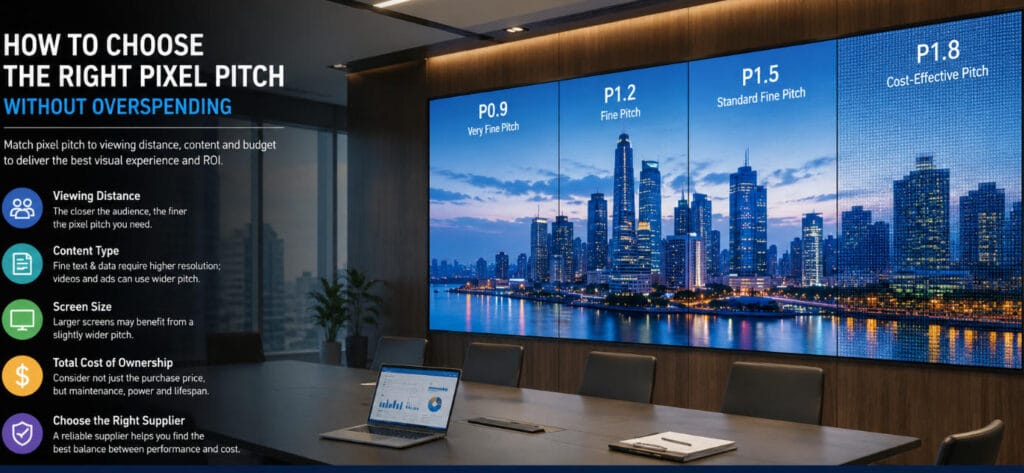
Choosing pixel pitch is one of the most important decisions in an LED display project—and one of the easiest places to overspend.
When buyers conduct an LED display supplier comparison, they often receive quotations for several pixel pitches: P0.9, P1.2, P1.5, P1.8, P2.5, or even finer options. Because a smaller number means higher pixel density, it is tempting to assume that the smallest pitch must provide the best result.
Technically, a finer pitch can deliver more pixels within the same physical area. Commercially, however, that does not mean every project benefits from paying for those additional pixels.
A well-designed LED display should provide enough resolution for the actual viewing distance, content, screen dimensions, and operating environment—without purchasing pixel density that the audience cannot meaningfully use.
For buyers trying to evaluate LED supplier proposals, pixel-pitch recommendations can also reveal something important about the supplier itself. A reliable supplier should be able to explain why a particular pitch is appropriate instead of automatically recommending the highest-resolution and most expensive option.
This guide explains how to find that balance.
The Real Question Is Not “What Is the Smallest Pixel Pitch?”
The better question is:
What is the largest pixel pitch that still delivers the visual performance the project requires?
That change in thinking can significantly improve project economics.
Imagine two suppliers quoting the same indoor LED wall. One recommends P0.9 while another recommends P1.5. At first glance, the P0.9 proposal appears technically superior because it contains substantially more pixels.
But several questions need to be answered first:
- How close will the nearest viewer actually stand or sit?
- What type of content will be displayed?
- How large is the complete LED wall?
- Is native 4K resolution genuinely necessary?
- Will the screen show spreadsheets and fine text, or mainly videos and advertising?
- How many hours per day will the display operate?
- What is the total project budget?
Without this information, recommending pixel pitch is largely guesswork.
This is why pixel pitch should be evaluated as part of the complete application—not as an isolated specification.
Start With the Minimum Viewing Distance
The closest regular viewer is usually more important than the farthest viewer.
When people are positioned close to an LED wall, insufficient pixel density can make the pixel structure noticeable, particularly around small text, thin lines, icons, and high-contrast graphics. As viewing distance increases, the visual difference between neighboring pixel pitches becomes less significant.
There is no universal viewing-distance formula that fits every application because human perception, content, brightness, contrast, and viewing conditions all affect the result.
Instead, use viewing distance as the first screening factor.
A control room where operators sit two meters from the screen requires a different approach from a hotel lobby where viewers normally stand six or eight meters away.
Similarly, an outdoor billboard viewed from across a road does not benefit from the same ultra-fine pitch used in a boardroom.
A good supplier should therefore ask for the minimum practical viewing distance before recommending the product.
If three suppliers recommend three different pitches, ask each one to explain how its recommendation relates to the closest viewer. This is a useful step in any LED display supplier comparison because it reveals whether the quotation was engineered around the project or selected from a standard price list.
Match Pixel Pitch to Content, Not Just Viewing Distance
Viewing distance alone is not enough.
The type of information shown on the LED wall often determines how much resolution is genuinely valuable.
Fine text and data visualization
Control rooms, financial environments, broadcast studios, and command centers may display small fonts, maps, dashboards, multiple video windows, charts, status indicators, and detailed interfaces.
Here, higher pixel density can create real operational value because more information must remain readable within a limited wall area.
Corporate presentations
Meeting rooms and auditoriums often display PowerPoint slides, documents, video conferencing windows, charts, and corporate videos.
Fine pitch remains important, but choosing the smallest available pitch may not be necessary if seating begins several meters away.
Retail and branding content
Retail displays typically emphasize photography, motion graphics, video, logos, and promotional messages. Viewers may move through the environment rather than study small text continuously.
In such cases, the visual difference between two fine-pitch options may be smaller than the price difference.
Large-format advertising
For large commercial displays viewed from greater distances, physical screen size, brightness, contrast, and content impact may matter more than extreme pixel density.
Spending additional budget on a larger visual area can sometimes create greater audience impact than using the same budget to reduce pixel pitch.
This is an important distinction: resolution should solve a content requirement, not satisfy a specification preference.
Calculate the Resolution You Actually Receive
Pixel pitch determines how many pixels fit into a given physical screen.
This relationship should be considered before comparing quotations.
Suppose your project requires a fixed wall approximately six meters wide. A finer pitch increases the horizontal pixel count without changing the physical dimensions. That sounds attractive—but the additional resolution only has value if your content, viewing distance, and application can use it.
For example, Meitec’s SIM Pro Series Indoor Small Pixel Pitch LED Display provides P0.9375, P1.25, P1.56, and P1.875 options within the same 600 × 337.5 mm cabinet platform. This allows designers to adjust pixel density while maintaining a consistent physical cabinet format.
For procurement teams, this creates a useful comparison method:
Keep the physical wall dimensions constant and request quotations for two or three realistic pixel pitches.
Then compare:
- Total screen resolution
- Total LED display cost
- Cost per usable pixel
- Visual difference at the actual viewing distance
- Power requirements
- Content requirements
- Long-term maintenance implications
The objective is to identify the point where paying for additional pixels produces diminishing visual returns.
Do Not Pay for 4K Just Because 4K Sounds Better
“4K LED wall” is an attractive specification, but native 4K resolution should not automatically become the target for every project.
To achieve 3840 horizontal pixels, the physical width required depends directly on pixel pitch.
At a finer pitch, 4K resolution can be achieved within a smaller physical area. At a larger pitch, the display must be wider.
The commercial question is whether native 4K provides meaningful value to the application.
For a control room displaying detailed information close to operators, the answer may be yes.
For a large stage backdrop or commercial advertising wall viewed from substantial distance, perhaps not.
Content processors can scale video to the screen’s actual resolution. Therefore, receiving a 4K video signal does not mean the LED wall itself must always contain exactly 3840 × 2160 physical pixels.
During an LED display supplier comparison, ask suppliers to provide both:
- The physical dimensions of the proposed display.
- The final native pixel resolution.
This prevents “4K,” “8K,” or “UHD” terminology from replacing an engineering discussion.
Understand Why Smaller Pitch Usually Costs More
Reducing pixel pitch does more than increase the number of LEDs.
More pixels per square meter influence manufacturing complexity, component density, calibration requirements, module yield, driver configuration, heat management, and quality-control demands.
As pitch becomes increasingly fine, small manufacturing inconsistencies also become more important.
This is especially relevant in premium professional installations.
Meitec’s NOC Pro Series COB Micro LED Display is designed for close-viewing professional environments and offers ultra-fine configurations including approximately P0.78, P0.94, and P1.25 using Full Flip-Chip COB technology. Such products can make sense for command centers, visualization rooms, studios, and other applications where high information density or close viewing justifies the investment.
But installing an ultra-fine COB display where viewers are consistently far away can mean paying for performance that is rarely perceived.
Premium technology makes the most sense when the application can benefit from it.
Compare the Price Difference Against the Visual Difference
This is one of the most effective ways to avoid overspending.
Suppose a supplier offers:
- Option A: P1.25
- Option B: P1.56
- Option C: P1.875
Do not simply compare specifications.
Ask for demonstrations using your actual content at your actual viewing distance whenever possible.
Then evaluate whether moving from P1.875 to P1.56 produces an obvious improvement.
Next, determine whether moving from P1.56 to P1.25 produces another improvement of similar importance.
Frequently, visual benefit does not increase at the same rate as project cost.
There may be a “sweet spot” where image quality already meets the application requirement and further reductions in pixel pitch provide only marginal benefits.
That sweet spot is where project value is often maximized.
Pixel Pitch Should Be Evaluated With Screen Size
A common procurement mistake is deciding pixel pitch before finalizing screen dimensions.
The two decisions are connected.
If your budget is fixed, you may face a choice between:
Option 1: a smaller screen with finer pitch.
Option 2: a larger screen with slightly wider pitch.
Which is better depends on the application.
For a command center that must display many detailed windows, pixel density may take priority.
For an auditorium, showroom, stage, or retail environment, a larger physical image may generate greater visual impact.
This is why experienced system design should optimize the entire display rather than maximize a single specification.
Evaluate Total Cost, Not Only Module Price
Pixel pitch affects the purchase price, but procurement decisions should also consider total project cost.
Depending on the system, costs may include:
- LED cabinets and modules
- Control equipment
- Video processors
- Power distribution
- Structural installation
- Spare modules
- Shipping
- Installation labor
- Calibration
- Electricity consumption
- Maintenance access
- Future replacement parts
- Technical support
A cheaper screen can become expensive if servicing is difficult. Likewise, an unnecessarily fine-pitch display may increase initial investment without producing a proportional operational benefit.
Meitec discusses this broader procurement principle in its LED Display Buying Guide for First-Time Buyers, which explains why quotations should be compared as complete systems rather than only by screen price.
This principle is particularly useful when buyers evaluate LED supplier quotations from different manufacturers.
Use Pixel-Pitch Recommendations to Evaluate the Supplier
The recommendation process itself provides valuable information about supplier quality.
Before recommending a pitch, a professional LED display supplier should normally want to understand:
- Installation environment
- Screen width and height
- Minimum and typical viewing distance
- Content type
- Required resolution
- Ambient lighting
- Operating hours
- Installation method
- Maintenance access
- Budget range
Be cautious if a supplier recommends a premium ultra-fine product before asking these questions.
A technically responsible supplier should also be comfortable proposing a less expensive pitch when the application does not justify the finer option.
When conducting an LED display supplier comparison, ask:
“Why are you recommending this pitch instead of the next larger pitch?”
The answer can be extremely revealing.
Strong suppliers will discuss viewing distance, resolution, screen dimensions, content, and application requirements.
Weak suppliers may simply say, “smaller pitch has better quality.”
That answer is technically incomplete and commercially unhelpful.
Ask Suppliers to Quote Alternative Configurations
One of the simplest ways to improve procurement decisions is to request more than one option.
Instead of asking:
“Please quote a P1.25 display.”
Try:
“My screen is approximately 5 × 2.8 meters, the closest viewer is three meters away, and the display will show presentations, video conferencing, dashboards, and promotional videos. Please recommend the most cost-effective pixel pitch and provide one higher-resolution alternative.”
This gives the supplier room to engineer the solution.
You can then compare whether suppliers reach similar conclusions.
If one recommends P0.9, another P1.25, and another P1.8, ask each company to justify the decision quantitatively and visually.
This approach turns price comparison into solution comparison.
A Practical Five-Step Pixel-Pitch Decision Process
For most projects, the following process provides a strong starting point.
Step 1: Establish the closest normal viewing position.
Do not use an unrealistic distance where someone might occasionally stand. Use the closest position from which the screen will regularly be viewed.
Step 2: Define the most demanding content.
Focus on the smallest text, most detailed dashboard, or highest-density interface—not simply the promotional video.
Step 3: Fix the approximate physical screen dimensions.
This allows suppliers to calculate actual pixel resolution for each pitch.
Step 4: Compare two or three realistic pitches.
Avoid comparing an obviously inadequate option with an unnecessarily premium option.
Step 5: Evaluate the incremental benefit.
Ask whether the visual improvement from the finer pitch is worth the additional project investment.
This process helps prevent both under-specification and over-specification.
How Meitec Approaches Pixel-Pitch Selection
At Meitec, pixel pitch is treated as one element of a complete LED display solution.
Different applications require different priorities. A control room may emphasize information density and continuous operation. A corporate meeting room may balance close viewing, image quality, and architectural integration. Retail installations may prioritize visual impact, while outdoor applications may place greater emphasis on brightness, environmental protection, and viewing distance.
Rather than assuming that the smallest pitch is automatically the best choice, Meitec can evaluate screen dimensions, audience distance, content, installation environment, resolution targets, maintenance requirements, and project budget before developing a suitable configuration.
The goal is not to maximize the number of pixels purchased.
The goal is to deliver the visual performance the project actually needs.
Final Thoughts: Buy Useful Resolution, Not Maximum Resolution
Pixel pitch has a direct impact on image quality, system resolution, and project cost—but smaller is not automatically better.
The correct choice is the pitch that provides sufficient detail at the required viewing distance, supports the intended content, fits the available screen dimensions, and creates a reasonable return on the additional investment.
For buyers making an LED display supplier comparison, pay close attention to how each company arrives at its recommendation.
A supplier focused mainly on selling specifications may push the smallest available pitch.
A supplier focused on project performance should be able to explain where extra resolution creates value—and where it does not.
That is also one of the most practical ways to evaluate LED supplier expertise before placing an order.
Choose enough resolution to make the display perform exceptionally well.
Just do not pay for pixels your audience will never notice.