Author: Meitec Technical Team
Reviewed by: LED Display Product Specialist
Category: Product Basics / Quality & Reliability
Last Updated: September 2026
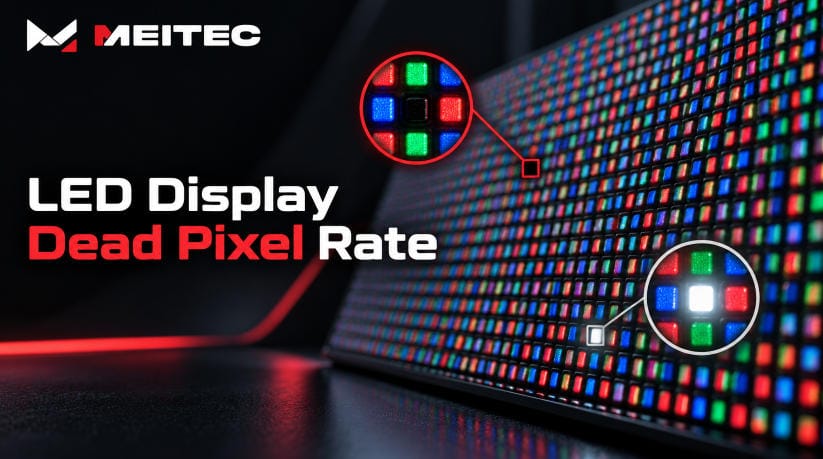
LED display dead pixel rate is the proportion of pixels on an LED screen that fail to operate correctly compared with the total number of pixels on the display.
A dead pixel may remain permanently dark, while other pixel faults can cause one color channel to disappear, remain continuously illuminated, or behave intermittently.
Because a modern LED display can contain hundreds of thousands or millions of pixels, even a very small defect percentage can represent multiple visible pixel failures.
Dead pixel rate is therefore an important reliability and quality-control indicator when evaluating an LED display. However, the percentage alone does not tell the complete story. The type, location, distribution, pixel pitch, viewing distance, and application of the defective pixels also affect how noticeable the problem is.
This guide explains what LED display dead pixel rate means, how it is calculated, why pixels fail, how defects are detected, and what buyers should consider during factory acceptance and long-term operation.
What Is a Dead Pixel on an LED Display?
A full-color LED display creates each pixel from red, green, and blue light-emitting elements.
Under normal operation, the display control system adjusts the output of these RGB components to reproduce different colors and brightness levels.
A pixel becomes defective when one or more of these components cannot reproduce the required output correctly.
The term dead pixel is sometimes used broadly, but several different failure conditions should actually be distinguished.
Dead Pixel
A dead pixel is normally understood as a pixel that does not illuminate when it should.
If all RGB components fail, the pixel appears as a dark point against illuminated content.
Dead Sub-Pixel
Sometimes only one LED component fails.
For example, the red component may no longer illuminate while green and blue continue to operate.
The pixel is not completely dark, but it cannot reproduce colors correctly.
This is technically better described as a dead sub-pixel or defective color channel.
Stuck or Bright Pixel
A stuck pixel remains illuminated even when the control system commands it to turn off.
On a black test screen, it may appear as a persistent red, green, blue, or white point.
Intermittent Pixel
Some pixel problems appear only occasionally.
A pixel may flicker, change color, disappear after the display becomes warm, or fail only at certain brightness levels.
These defects should be recorded separately because they may indicate unstable soldering, driver problems, signal issues, or thermal-related failures rather than a permanently dead LED.
How Is LED Display Dead Pixel Rate Calculated?
The basic calculation is:
Dead Pixel Rate = Number of Defective Pixels ÷ Total Number of Pixels × 100%
For example, suppose an LED screen has a physical resolution of:
1920 × 1080 = 2,073,600 pixels
If 10 complete pixels are defective:
10 ÷ 2,073,600 × 100% ≈ 0.000482%
The same value can also be expressed in parts per million:
10 ÷ 2,073,600 × 1,000,000 ≈ 4.82 ppm
PPM means parts per million and is often more convenient when discussing very low pixel failure rates.
A pixel failure rate is essentially the proportion of defective imaging units that do not operate as intended. Some technical specifications therefore use terms such as pixel failure rate, defective pixel rate, blind pixel rate, or dead pixel rate for closely related measurements.
Before comparing specifications from different suppliers, buyers should confirm exactly what is being counted.
One supplier may count only complete RGB pixel failures, while another may include individual RGB sub-pixel defects.
Those measurements are not directly equivalent.
Is There a Standard Acceptable Dead Pixel Rate?
There is no single universal dead-pixel percentage that should automatically be applied to every LED display project.
Different manufacturers, product technologies, project applications, contracts, and technical standards may define different limits.
For this reason, a number such as “0.01%” or “0.001%” should not automatically be treated as a universal industry requirement.
Technical acceptance should instead define:
- Whether complete pixels or individual RGB components are counted
- The maximum number or rate of defects
- Whether adjacent defective pixels are permitted
- Whether stuck bright pixels are counted separately
- The test patterns used during inspection
- The viewing distance and lighting conditions
- The corrective action if the limit is exceeded
This is especially important because two screens with exactly the same calculated dead pixel rate can look very different.
Ten defective pixels scattered randomly across a large outdoor display may have limited visual impact.
Ten defective pixels concentrated together on a fine-pitch control-room screen can form an obvious dark area.
For professional projects, dead pixel rate should therefore be treated as one part of an acceptance specification rather than an isolated marketing number.
Why Do LED Display Pixels Fail?
A pixel can fail for many reasons, and not every dead pixel has the same root cause.
LED Component Failure
The LED chip or package itself can fail electrically or physically.
Manufacturing defects, excessive electrical stress, long-term aging, moisture, or mechanical damage can all contribute.
Poor Solder Connections
In SMD LED modules, individual LED packages are soldered to the PCB.
Weak solder joints, insufficient solder, contamination, or thermal stress can cause an LED connection to become open or unstable.
These defects may appear immediately or develop after transportation and long-term operation.
Driver IC Problems
LED driver ICs control the electrical current supplied to pixels.
A driver failure can affect one pixel, one RGB channel, a row, a column, or a larger group of pixels.
Therefore, a dark point on a screen does not always mean the LED package itself is defective.
PCB or Circuit Damage
Damaged traces, poor connections, corrosion, or electrical faults on an LED module PCB can interrupt the signal or power supplied to pixels.
Moisture and Environmental Exposure
Outdoor LED displays are exposed to humidity, temperature changes, dust, rainfall, and other environmental conditions.
If protection or sealing is insufficient, moisture can cause corrosion or electrical leakage that may eventually result in pixel faults.
Electrostatic Discharge
LED semiconductor components can be sensitive to electrostatic discharge during manufacturing, assembly, maintenance, or handling.
Appropriate ESD protection is therefore important throughout production and servicing.
Mechanical Impact
Pixels on traditional SMD displays are physically exposed on the module surface.
Impact during installation, transportation, cleaning, or maintenance can damage individual LED packages.
This issue is particularly important for fine-pitch displays because the LEDs are smaller and more densely arranged.
Dead Pixel Rate and LED Packaging Technology
Packaging technology can influence how vulnerable the LED display surface is to physical damage.
Traditional SMD displays use individually packaged LEDs mounted on the PCB surface.
Fine-pitch products use smaller LEDs with closer spacing, increasing pixel density but also making component-level handling more demanding.
COB technology uses a different packaging structure in which LED chips are integrated and protected at the module level.
The protective surface can improve resistance to impact, dust, moisture, and repeated physical contact, depending on the specific product design.
For applications requiring high pixel density and close viewing, this durability is one reason COB technology has become increasingly relevant.
You can explore Meitec’s COB LED Display solutions for examples of fine-pitch COB display architectures.
Packaging technology, however, should not be used as a substitute for actual quality evaluation.
PCB design, LED chip quality, encapsulation, manufacturing process control, thermal management, electrical design, and aging tests all influence long-term pixel reliability.
How Are Dead Pixels Detected?
Dead pixel inspection should not rely only on normal video playback.
Some defects are difficult to see in moving content but become obvious under a uniform test pattern.
A basic inspection normally uses several full-screen images.
Full Red Screen
A red test pattern checks whether all red components illuminate correctly.
A defective red sub-pixel may appear dark.
Full Green Screen
This checks the green components.
Full Blue Screen
This checks the blue components.
Full White Screen
White requires all RGB channels to operate together.
It can therefore reveal missing color channels, abnormal pixels, brightness differences, and other inconsistencies.
Full Black Screen
A black screen is useful for identifying pixels that remain illuminated when they should be off.
These are usually described as stuck, bright, or abnormal pixels rather than conventional dark dead pixels.
For factory inspection, technicians should record both the quantity and physical location of defects.
This is more useful than recording only a percentage because a defect map can identify whether failures are random or concentrated in one module or cabinet.
Why Aging Tests Matter
Some pixel defects exist immediately after manufacturing, while others appear only after the display has operated continuously.
This is one reason LED displays commonly undergo an aging or burn-in stage before shipment.
During aging, modules or complete cabinets operate for an extended period while technicians inspect their performance.
The process can help expose early failures related to:
- LEDs
- Solder joints
- Driver ICs
- Power connections
- Signal transmission
- Thermal behavior
- Module assembly
At Meitec, product quality control includes incoming material inspection, manufacturing process control, calibration, aging, functional verification, and final inspection before shipment.
More information about the inspection process is available on the Meitec LED Display Quality Control page.
Does Calibration Fix Dead Pixels?
No.
Calibration and dead-pixel repair are different processes.
LED display calibration adjusts the brightness or color output of functioning pixels to improve screen uniformity.
If one LED is slightly brighter or darker than surrounding LEDs but still operates correctly, calibration may compensate for that variation.
A physically failed pixel cannot be restored through calibration software.
If the LED, solder connection, driver circuit, or PCB connection has failed, hardware repair or module replacement is normally required.
This distinction is important during troubleshooting.
A dark point caused by brightness inconsistency is different from a pixel that produces no light at all.
For a detailed explanation, see What Is LED Display Calibration?
Why Dead Pixels Matter More on Fine-Pitch Displays
As pixel pitch becomes smaller, viewers generally use the display from shorter distances.
This makes individual pixel abnormalities easier to notice.
A single defective pixel on a large outdoor P10 screen viewed from 30 meters away may have almost no practical visual impact.
The same type of failure on a P0.9 or P1.2 indoor video wall viewed from one or two meters can be much more noticeable.
The application also matters.
A few isolated defects may be less critical on an outdoor advertising display than on a broadcast studio, command center, premium corporate boardroom, or monitoring room where operators view detailed information continuously.
Fine-pitch projects therefore often require more stringent quality control and defect management.
Meitec’s Fine Pitch LED Display range provides examples of displays designed for applications where close-range image consistency is important.
Can Dead Pixel Rate Increase Over Time?
Yes.
Dead pixel rate is not necessarily fixed throughout the life of the display.
Pixels may fail gradually because of operating conditions such as:
- High operating temperature
- Excessive brightness or electrical load
- Moisture
- Corrosion
- Repeated thermal cycling
- Mechanical damage
- Component aging
- Power instability
For this reason, buyers should distinguish between two questions:
What is the pixel condition when the display leaves the factory?
and
How reliably will the pixels operate after thousands of hours of use?
A low factory defect rate is important, but long-term reliability also depends on material quality, electrical design, thermal management, manufacturing consistency, environmental protection, installation quality, and maintenance.
What Should Buyers Check Before Accepting an LED Display?
Dead pixel requirements should ideally be clarified before mass production rather than after the display reaches the installation site.
A practical factory acceptance process should verify:
- Total physical pixel count
- Number of complete dead pixels
- Number of RGB sub-pixel defects
- Number of stuck or continuously bright pixels
- Whether adjacent pixel defects exist
- Whether intermittent defects appear during aging
- Location of each abnormal pixel
- Test patterns and inspection conditions
- Corrective action or module replacement requirements
- Final inspection results after repair
A supplier specification that lists only “dead pixel rate” without defining the measurement method can be difficult to evaluate.
Buyers should ask what the value means and how it is verified.
This is consistent with a broader principle in LED display procurement: specifications should be linked to measurable project requirements rather than judged only by whichever quotation presents the most impressive numbers.
Should One Dead Pixel Require Module Replacement?
Not necessarily.
The correct action depends on the product, application, defect position, warranty agreement, service method, and acceptance criteria.
For some high-end fine-pitch installations, a highly visible single pixel fault may justify repair.
For a large outdoor screen, an isolated defect that cannot be seen from the normal viewing position may have little practical impact.
Multiple adjacent failures are generally more noticeable than the same number of isolated defects distributed across a large screen.
Maintenance decisions should therefore consider both engineering measurements and actual visual impact.
How Can Dead Pixel Problems Be Reduced?
No LED display technology can guarantee that a pixel will never fail during its entire operating life.
However, failure risk can be reduced through proper manufacturing and operation.
Important factors include:
- Consistent LED component selection
- Reliable PCB and soldering quality
- Controlled manufacturing processes
- ESD protection
- Stable driver and power design
- Thermal management
- Proper encapsulation and environmental protection
- Aging tests before shipment
- Careful packaging and transportation
- Correct installation
- Preventive maintenance
- Keeping suitable spare modules
The objective of quality control is therefore not simply to inspect pixels at the end of production.
It is to reduce the probability that defects are introduced throughout the entire manufacturing and operating process.
Frequently Asked Questions
Is a dead pixel the same as a dead LED?
Not always. A full RGB pixel can contain several light-emitting components. One component can fail while the remaining colors continue operating. In addition, a pixel may appear dead because of driver, PCB, signal, or soldering problems rather than failure of the LED chip itself.
Can software repair a dead pixel?
Software may correct configuration, mapping, or calibration problems, but it cannot repair a physically failed LED or electrical connection.
Can a dead LED pixel be repaired?
In many SMD modules, technicians can replace individual LED packages using appropriate repair equipment. In other cases, replacing the complete module may be more practical. The repair method depends on the display architecture.
What is ppm in LED display specifications?
PPM means parts per million. A pixel failure rate of 10 ppm means approximately 10 defective pixels for every one million pixels, assuming the specification counts complete pixels.
Should buyers compare dead pixel rates between suppliers?
Yes, but only after confirming that the suppliers use the same definition, test method, inspection conditions, and measurement unit. Otherwise, the numbers may not be directly comparable.
Conclusion
LED display dead pixel rate measures how many pixels fail to operate correctly relative to the total pixel population of a screen.
The calculation itself is simple, but interpreting the result requires more context.
A complete quality assessment should distinguish between dead pixels, defective RGB sub-pixels, stuck pixels, intermittent faults, and clustered defects. It should also consider pixel pitch, viewing distance, application, defect location, test conditions, and long-term reliability.
There is no single percentage that defines acceptable performance for every LED display.
For professional projects, the most reliable approach is to establish clear pixel-defect definitions and acceptance criteria before production, verify the screen with RGB, white, and black test patterns, and document defects during factory inspection and aging tests.
Dead pixel rate is therefore best understood not as an isolated specification, but as one indicator within the wider quality and reliability system of an LED display.