Author: Meitec Technical Team
Reviewed by: LED Display Product Specialist
Category: Product Basics
Last Updated: September 2026
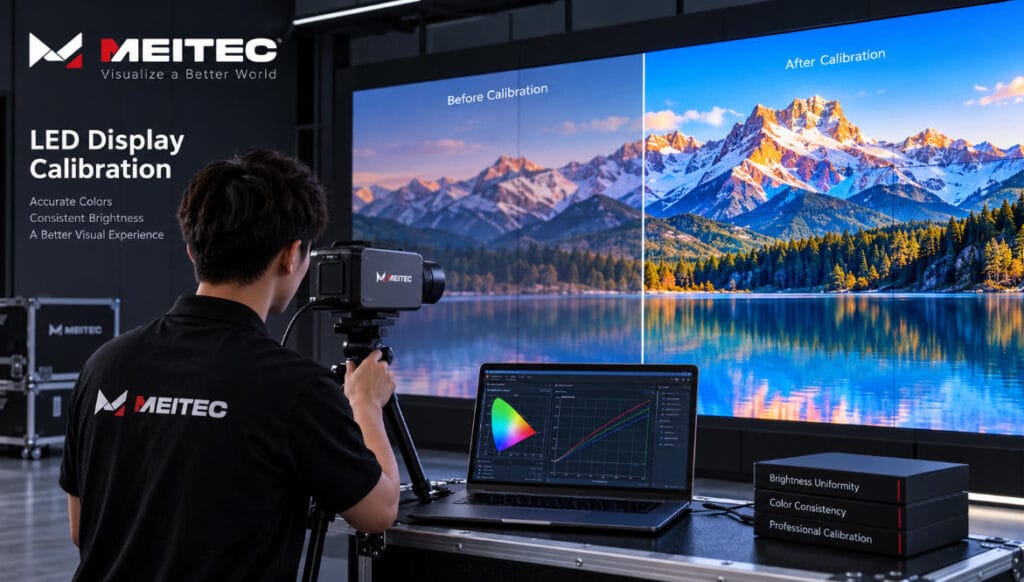
LED display calibration is the process of measuring and correcting differences in brightness and color among the pixels or modules of an LED screen. Its purpose is to make the entire display appear visually uniform and reproduce colors more accurately.
An LED screen may contain hundreds of thousands or even millions of individual red, green, and blue LEDs. Although these LEDs may have the same nominal specifications, their actual light output and color characteristics are never perfectly identical.
Without calibration, these small differences can become visible as brighter or darker modules, color patches, inconsistent white balance, or noticeable boundaries between cabinets.
Calibration compensates for these variations by measuring the optical performance of the display and generating correction coefficients for individual pixels or groups of pixels.
For professional LED displays, calibration is therefore an important part of image-quality control rather than simply a software adjustment.
Why Do LED Displays Need Calibration?
LEDs are semiconductor devices, and their optical characteristics naturally vary during manufacturing.
Two LEDs of the same model can produce slightly different brightness levels or color coordinates when driven by the same electrical signal. These differences become more noticeable when thousands of LEDs are assembled into modules and multiple modules are assembled into a complete LED wall.
Variation may come from several sources:
- LED chip manufacturing tolerances
- Differences between LED production batches
- Driver IC characteristics
- PCB and electrical variations
- Module manufacturing tolerances
- Temperature differences
- LED aging
- Replacement modules or cabinets
A single module may look acceptable when tested independently but still appear different when installed next to other modules.
Calibration reduces these differences so that the viewer perceives one continuous image rather than a collection of separate LED modules and cabinets.
What Does LED Display Calibration Correct?
LED display calibration mainly deals with brightness uniformity and color uniformity.
Brightness Calibration
Brightness calibration corrects differences in luminous intensity among pixels.
Suppose one LED pixel produces slightly more light than surrounding pixels at the same input value. On a large display, similar variations across thousands of pixels can create visible bright spots, dark areas, stripes, or module boundaries.
A calibration system measures the output of the pixels and determines how much each pixel needs to be adjusted.
The correction coefficients are then applied through the LED control system.
The goal is not simply to maximize brightness. In fact, calibration normally requires stronger pixels to be reduced so that they match the performance of weaker pixels within an acceptable target range.
This means calibrated maximum brightness can be slightly lower than the theoretical maximum brightness of an uncorrected display.
The trade-off is much better visual uniformity.
Color Calibration
A full-color LED pixel contains red, green, and blue components. Differences in these components affect the color produced by the pixel.
Color calibration adjusts the RGB output so that pixels reproduce more consistent target colors and white balance.
This is particularly important for LED displays used in environments where accurate image reproduction matters, such as:
- Broadcast studios
- Control rooms
- Corporate display systems
- Retail environments
- Exhibition spaces
- Fine-pitch LED video walls
- Virtual production applications
For example, Meitec’s MTCOB Pro Series uses pixel color calibration technology designed to independently calibrate LED pixels and improve color uniformity.
How Does LED Display Calibration Work?
Professional LED display calibration normally involves three basic stages: measurement, calculation, and correction.
1. Measuring the Display
A calibration system uses optical measurement equipment, such as a camera-based calibration device, colorimeter, or spectroradiometer, depending on the calibration method and required accuracy.
The display shows a series of test patterns.
Red, green, blue, white, and different grayscale levels may be measured to determine how individual pixels or screen regions actually perform.
The measurement system collects data such as:
- Luminance
- RGB intensity
- Color coordinates
- White balance
- Uniformity
These measurements create an optical performance map of the screen.
2. Calculating Correction Coefficients
The calibration software compares measured values with the selected target values.
Pixels that are too bright require negative correction. Pixels whose RGB components do not match the target color coordinates require corresponding color adjustment.
The software then calculates correction coefficients for the pixels.
A simplified way to understand this is:
Corrected Output = Original Output × Calibration Coefficient
Real LED calibration algorithms are more complex because RGB channels, grayscale behavior, brightness targets, and control-system limitations must also be considered.
3. Applying and Storing Calibration Data
After the coefficients are generated, they are transferred to the LED display control system.
Depending on the system architecture, calibration data may be stored in receiving cards, modules, or other memory within the display system.
When image data is subsequently sent to the screen, the system applies these correction values before driving the LEDs.
The process happens electronically and does not change the physical LEDs themselves.
This is one reason the receiving-card architecture is important. The receiving card controls how image data is distributed to LED modules and can participate in functions such as correction-data management and display configuration.
Module Calibration vs. Full-Screen Calibration
Not all calibration is performed at the same level.
Module-Level Calibration
LED modules can be calibrated during manufacturing before they are assembled into cabinets.
This helps establish good pixel-level uniformity early in production.
Module calibration is useful for quality control, but it does not automatically guarantee perfect uniformity after the complete screen is assembled.
Modules from different production batches or operating histories may still look different when placed together.
Cabinet-Level Calibration
Cabinets can also be measured and corrected as complete display units.
This is particularly useful for rental LED displays, where cabinets may frequently be combined in different configurations.
Good cabinet-to-cabinet consistency reduces visible boundaries when the screen is assembled.
Full-Screen Calibration
Full-screen calibration is performed after cabinets have been assembled into the final LED wall.
This method evaluates the actual visual performance of the complete display and can compensate for differences that become visible only after installation.
It is especially valuable for large fine-pitch installations where the audience views the display from relatively short distances.
You can explore Meitec’s Fine Pitch LED Display range to see examples of display systems where close-viewing image consistency is particularly important.
Factory Calibration vs. On-Site Calibration
Factory calibration and on-site calibration serve different purposes.
Factory calibration is performed during manufacturing under controlled conditions. It establishes the initial brightness and color consistency of modules or cabinets before shipment.
Its advantages include controlled lighting, standardized measurement conditions, and efficient calibration of multiple production units.
On-site calibration is performed after installation or during the service life of the display.
It can account for conditions that cannot always be reproduced at the factory, including the final cabinet arrangement, replacement modules, different operating histories, and long-term aging.
Factory calibration provides the starting point. On-site calibration can restore or optimize uniformity after the display has been operating in its actual environment.
Calibration and Grayscale Are Not the Same Thing
Calibration and grayscale are related to LED display image quality, but they describe different concepts.
Grayscale describes how many brightness levels an LED display can reproduce between minimum and maximum output.
Calibration corrects differences in the actual optical output of pixels.
A display can therefore support high grayscale processing and still have poor pixel uniformity if it is not properly calibrated.
Similarly, calibration cannot compensate for every limitation of the display’s processing architecture.
High-quality image reproduction depends on several interacting factors, including:
- Calibration
- Grayscale
- Refresh rate
- Driver IC performance
- Control-system processing
- LED consistency
- Contrast ratio
- Content quality
For example, Meitec’s COB solutions combine fine-pitch display technology with features intended to improve color consistency and detailed grayscale reproduction. You can find the broader product family on the Meitec COB LED Display page.
When Should an LED Display Be Recalibrated?
Calibration is not necessarily a one-time process.
LEDs gradually change as they operate. Their brightness can decrease over time, and red, green, and blue LEDs do not always age at exactly the same rate.
Environmental conditions can also influence long-term performance.
Recalibration may be useful when:
- The screen has operated for a long period
- Visible color patches appear
- Brightness becomes uneven
- Modules have been replaced
- Cabinets from different batches are combined
- A rental inventory contains cabinets with different operating hours
- Major maintenance has been completed
- Higher color accuracy is required for a new application
There is no universal recalibration interval that applies to every LED screen.
The appropriate interval depends on operating hours, LED quality, environment, application, brightness settings, maintenance history, and the required level of visual consistency.
A screen used occasionally in a meeting room has very different operating conditions from an outdoor advertising display running many hours every day.
Why Can Replacement Modules Look Different?
A common maintenance problem occurs when a failed LED module is replaced and the new module appears brighter or has a different color tone.
This does not necessarily mean the replacement module is defective.
The original modules may have accumulated thousands of operating hours, while the replacement module may be almost new. Their LEDs therefore have different aging histories.
Production batches can also have slightly different optical characteristics.
Calibration coefficients can help reduce these differences.
For projects where long-term visual consistency is important, keeping properly matched spare modules from the original production batch is still recommended. Calibration should complement good spare-parts planning rather than replace it.
Can Calibration Fix Every Image-Quality Problem?
No.
Calibration is powerful, but it has physical limits.
It can correct reasonable differences in pixel brightness and color, but it cannot repair:
- Dead LEDs
- Damaged driver ICs
- Faulty receiving cards
- Incorrect module wiring
- Severe LED degradation
- Power-supply failures
- Physical cabinet misalignment
- Poor-quality video sources
If one pixel is physically incapable of reaching the required output, software correction cannot restore its original hardware performance.
This is why troubleshooting should distinguish between a uniformity problem and a hardware failure before recalibration is performed.
Does Calibration Affect Maximum Brightness?
It can.
Calibration generally establishes a common target that all usable pixels can reproduce consistently.
If some pixels are significantly brighter than others, their output must be reduced to match the target.
As a result, the calibrated screen may have lower maximum luminance than its absolute uncorrected peak.
This should not automatically be considered a disadvantage.
For most professional applications, a slightly lower but uniform screen provides better image quality than a brighter screen with obvious pixel, module, or cabinet variations.
Calibration in Fine-Pitch and COB LED Displays
Calibration becomes increasingly important as pixel pitch decreases and viewing distance becomes shorter.
At close distances, users can more easily notice subtle variations in brightness, white balance, and color.
Fine-pitch displays used in control rooms, conference rooms, studios, and premium commercial environments therefore require strong consistency across the entire screen.
COB LED displays also benefit from precise calibration because their dense pixel structure and close-viewing applications make uniform image reproduction particularly important.
The objective remains the same regardless of packaging technology: the screen should visually behave as one continuous display surface.
Practical Checklist After Calibration
After calibration, technicians should not rely only on the calibration software’s completion message.
The display should be visually checked using several types of content.
Useful test patterns include:
- Full red, green, and blue screens
- Full white
- Low-grayscale images
- Gray gradients
- Skin tones
- Dark video scenes
- High-brightness content
- Uniform single-color backgrounds
Technicians should check for visible module boundaries, color patches, abnormal pixels, brightness differences, and inconsistent grayscale transitions.
Calibration data should also be backed up where supported by the control system. This can simplify restoration after receiving-card replacement, configuration changes, or maintenance.
Frequently Asked Questions
Is every LED display calibrated at the factory?
Professional LED displays commonly undergo brightness and color consistency adjustment during production, but the calibration method and accuracy can differ between manufacturers, product series, and project requirements. Buyers should confirm what type of calibration is included rather than assuming all displays receive the same process.
Can an installed LED screen be calibrated?
Yes. Many LED display systems can be recalibrated after installation using compatible calibration equipment and control-system software.
How long does LED display calibration take?
There is no fixed time. Screen resolution, physical size, calibration equipment, measurement method, control system, and required accuracy all affect the process.
Is calibration necessary after replacing a module?
Not always, but recalibration or correction-coefficient restoration may be necessary when the replacement module is visibly different from surrounding modules.
What is the difference between calibration and screen configuration?
Configuration defines how the control system drives and maps the LED display. Calibration corrects optical differences in brightness and color. They are separate processes, although both may use software associated with the LED control system.
Conclusion
LED display calibration is the process of measuring pixel-level or module-level optical differences and compensating for them through correction coefficients.
Its primary purpose is to improve brightness uniformity, color consistency, white balance, and overall image continuity across an LED screen.
Calibration can be performed at module, cabinet, or complete-screen level and may take place during manufacturing or after installation. It is especially important when modules have different production or aging histories and in fine-pitch applications where small visual differences are easier to notice.
However, calibration should not be treated as a solution for every display problem. Hardware quality, LED consistency, driver performance, receiving-card configuration, grayscale processing, mechanical alignment, maintenance, and operating conditions all contribute to final image quality.
For an LED display system, good calibration is one part of a broader objective: making thousands or millions of individual LEDs perform as one visually consistent display surface.