Author: Meitec Technical Team
Reviewed By: LED Display Product Specialist
Last Updated: August 2026
Pixel pitch is one of the most important specifications when evaluating an LED display. It directly affects pixel density, image detail, recommended viewing distance, screen resolution and, in many cases, the overall project cost.
However, pixel pitch is also frequently misunderstood. A smaller pixel pitch does not automatically mean a better LED display, and selecting the smallest available pitch can result in unnecessary investment. The correct specification depends on how the screen will be used, how close viewers will be to it, what content will be displayed and how much physical space is available for the installation.
This guide explains what pixel pitch means, how it affects LED display performance, how to calculate resolution and how to select an appropriate pixel pitch for different applications.
What Does Pixel Pitch Mean in an LED Display?
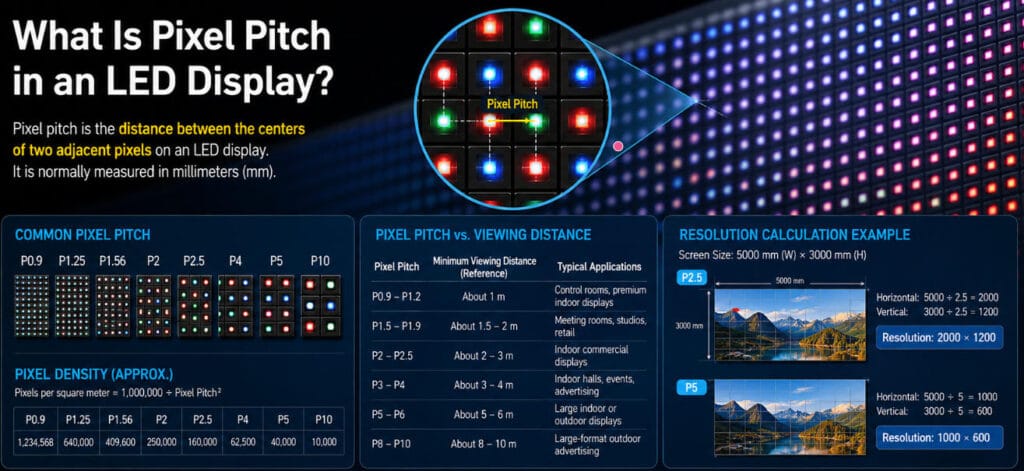
Pixel pitch is the distance between the centers of two adjacent pixels on an LED display. It is normally measured in millimeters and expressed with the letter P.
For example:
- P1.25 = 1.25 mm between adjacent pixels
- P1.5 = 1.5 mm
- P2.5 = 2.5 mm
- P4 = 4 mm
- P10 = 10 mm
In general, a smaller pixel pitch means that the pixels are positioned closer together. This increases the number of pixels within the same display area and allows the screen to reproduce more image detail.
A larger pixel pitch means fewer pixels per square meter. This usually reduces resolution at the same physical screen size but can be appropriate for displays viewed from longer distances.
Pixel pitch should therefore be understood as a relationship between physical pixel spacing and viewing requirements, not simply as a measure of product quality.
How Does Pixel Pitch Affect LED Display Resolution?
Pixel pitch determines how many pixels can fit into a specific physical area.
The smaller the pitch, the higher the potential pixel density.
For a simplified comparison:
| Pixel Pitch | Approximate Pixel Density per m² |
|---|---|
| P1.25 | 640,000 pixels |
| P1.5 | 444,444 pixels |
| P2 | 250,000 pixels |
| P2.5 | 160,000 pixels |
| P4 | 62,500 pixels |
| P10 | 10,000 pixels |
The approximate pixel density can be calculated using:
Pixels per square meter = 1,000,000 ÷ Pixel Pitch²
For example:
P2.5 = 1,000,000 ÷ 2.5² = 160,000 pixels per m²
This explains why fine-pitch LED displays are commonly used in applications where viewers are positioned close to the screen. More pixels within the same physical area allow text, graphics and video content to appear smoother at shorter viewing distances.
Meitec’s Fine Pitch LED Display solutions are designed for applications where higher pixel density and close-range viewing are important considerations.
Pixel Pitch vs. Viewing Distance
Viewing distance is one of the most important factors in pixel pitch selection.
A common rule of thumb is that the minimum comfortable viewing distance can be estimated from the pixel pitch value in millimeters. However, this should only be used as an initial reference.
For example:
| Pixel Pitch | Typical Minimum Viewing Distance* | Common Applications |
|---|---|---|
| P0.9–P1.2 | About 1 m | Control rooms, premium indoor displays |
| P1.5–P1.9 | About 1.5–2 m | Meeting rooms, studios, retail |
| P2–P2.5 | About 2–3 m | Indoor commercial displays |
| P3–P4 | About 3–4 m | Indoor halls, events, advertising |
| P5–P6 | About 5–6 m | Large indoor or outdoor displays |
| P8–P10 | About 8–10 m | Large-format outdoor advertising |
*Actual viewing requirements depend on content, screen size, brightness, viewer movement and application environment.
The important point is that the minimum viewing distance is not the same as the ideal viewing distance.
A viewer may be able to watch a P4 screen from 3–4 meters away, but the perceived image quality will depend heavily on whether the content contains large video elements or small text and detailed graphics.
For example, an outdoor advertising screen displaying large images and short messages can often use a larger pixel pitch than an indoor control room displaying maps, spreadsheets or detailed monitoring information.
This is why pixel pitch should never be selected based only on the question: “What is the closest distance?”
The complete viewing environment should be evaluated.
How to Calculate LED Display Resolution
The physical dimensions of an LED screen and its pixel pitch together determine its resolution.
The calculation is:
Horizontal Resolution = Screen Width (mm) ÷ Pixel Pitch (mm)
Vertical Resolution = Screen Height (mm) ÷ Pixel Pitch (mm)
For example, consider a screen measuring:
- Width: 5,000 mm
- Height: 3,000 mm
- Pixel Pitch: P2.5
The resolution would be:
5,000 ÷ 2.5 = 2,000 pixels wide
3,000 ÷ 2.5 = 1,200 pixels high
The final display resolution is therefore:
2000 × 1200 pixels
Now consider the same physical screen using P5.
5,000 ÷ 5 = 1,000 pixels wide
3,000 ÷ 5 = 600 pixels high
The resolution becomes:
1000 × 600 pixels
This demonstrates an important selection principle: screen size and pixel pitch must be evaluated together.
A large screen with a relatively large pixel pitch may still provide sufficient resolution because the physical display dimensions create enough pixels for the intended content.
Conversely, a small screen may require a finer pitch to achieve the same resolution.
Is a Smaller Pixel Pitch Always Better?
No.
A smaller pixel pitch increases pixel density, but it does not automatically improve the viewing experience in every project.
For a screen viewed from 30 or 50 meters away, the additional detail provided by an extremely fine pixel pitch may not be visible to the audience. In this situation, selecting a finer pitch can increase cost without producing a meaningful improvement in perceived image quality.
Smaller pixel pitch products may also involve:
- Higher LED density
- More LEDs and electronic components per square meter
- Higher manufacturing complexity
- Higher system cost
- More demanding production and calibration requirements
The goal should not be to select the smallest possible pixel pitch. The goal should be to select the most appropriate pixel pitch for the application.
This principle is also relevant during procurement. Meitec’s recent guide on LED display buying mistakes highlights why viewing distance, content, screen dimensions and budget should be evaluated together rather than choosing resolution in isolation.
Pixel Pitch and Image Quality: What Else Matters?
Pixel pitch is important, but it is only one part of overall LED display image quality.
Two displays with the same pixel pitch can still produce different visual results.
Other factors include:
LED Quality and Consistency
LED wavelength consistency, brightness consistency and color uniformity affect whether the display produces a balanced image.
Refresh Rate
A high refresh rate helps produce smoother video and can be particularly important for camera applications, virtual production and fast-moving content.
Grayscale Performance
Higher grayscale processing improves the display’s ability to reproduce smooth transitions between dark and bright areas.
Brightness
Indoor and outdoor displays require different brightness levels. A fine pixel pitch alone cannot compensate for insufficient brightness in a high-ambient-light environment.
Contrast Ratio
Good contrast helps maintain image depth and visual clarity, particularly when displaying dark content.
Calibration
Module and cabinet calibration affect brightness and color uniformity across the complete screen.
Content Quality
The source resolution must also be considered. A high-resolution LED display cannot create additional image detail that does not exist in the original content.
For this reason, pixel pitch should be evaluated as part of a complete display system rather than as an isolated specification.

How to Choose the Right Pixel Pitch
A practical selection process should begin with the application rather than the product model.
1. Identify the Nearest and Typical Viewing Distance
Do not evaluate only the closest possible viewer.
Consider:
- Minimum viewing distance
- Average viewing distance
- Maximum viewing distance
- Whether viewers are stationary or moving
- Whether people will approach the screen closely
A retail display, for example, may have a large range of viewing distances. Some customers may walk directly in front of the screen, while others view it from across the store.
2. Define the Type of Content
Different content requires different levels of visual detail.
For example:
- Large outdoor advertisements can tolerate larger pixel pitches.
- Presentation screens may require clear text and graphics.
- Control rooms may require fine detail and continuous close-range viewing.
- Broadcast or virtual production environments may have additional requirements related to camera performance.
Content should therefore influence pixel pitch selection.
3. Determine the Physical Screen Size
Calculate the resolution that the proposed screen size can achieve at different pixel pitches.
In some projects, increasing the physical screen size can provide more pixels and visual impact without requiring an unnecessarily fine pitch.
4. Consider the Installation Environment
Indoor and outdoor environments have different technical requirements.
Outdoor displays may require higher brightness, weather protection and longer viewing distances. Indoor displays may prioritize pixel density, contrast and close-range image quality.
For large commercial installations, Meitec’s LED display product range includes solutions for indoor, outdoor, rental, COB and creative display applications.
5. Balance Performance and Budget
The correct solution should provide sufficient image quality for the application without paying for resolution that the audience cannot effectively use.
A professional LED display specification should balance:
- Viewing distance
- Screen size
- Required resolution
- Content type
- Brightness
- Installation conditions
- Maintenance requirements
- Project budget
Typical Pixel Pitch Selection by Application
Fine-Pitch Indoor Displays
Fine-pitch LED displays are commonly used in:
- Control rooms
- Corporate meeting rooms
- Broadcast studios
- Retail spaces
- Exhibition centers
- Premium presentation environments
These applications often involve close viewing and detailed content, making higher pixel density important.
Indoor Commercial LED Displays
For larger indoor areas where the audience is positioned several meters from the screen, medium pixel pitches may provide a more practical balance between resolution and cost.
Typical applications include:
- Shopping malls
- Conference halls
- Exhibition spaces
- Airports
- Entertainment venues
Rental LED Displays
Rental applications must balance visual performance with installation speed, cabinet weight, structural requirements and viewing distance.
The correct pitch depends heavily on whether the event is designed for close audiences, large venues or mixed viewing distances.
Outdoor LED Displays
Outdoor displays are often viewed from longer distances and must also account for brightness, weather resistance and operating conditions.
For these projects, selecting an unnecessarily fine pitch may not provide proportional value. Larger-format outdoor displays can often use a wider pixel pitch while still delivering clear content to the intended audience.
Common Pixel Pitch Selection Mistakes
Choosing the Smallest Available Pitch
A smaller pitch increases resolution but may provide little visible benefit at long viewing distances.
Ignoring Screen Size
Pixel pitch cannot be evaluated without considering the physical dimensions of the display.
Using a Simple Distance Formula as the Only Criterion
Viewing distance formulas provide a useful starting point, but actual project conditions are more complex.
Ignoring Content Resolution
If the screen resolution significantly exceeds the source content, the additional pixels may not improve the actual image.
Comparing Products Only by Pixel Pitch
Two P2.5 LED displays can differ significantly in LED quality, brightness, calibration, refresh rate, grayscale and system reliability.
Selecting Pixel Pitch Before Evaluating the Application
The application should define the technical requirements, not the other way around.
Pixel Pitch and COB LED Technology
As pixel pitches become smaller, LED packaging technology becomes increasingly important.
COB, or Chip-on-Board, technology is used in fine-pitch and micro LED display applications to support high pixel density and improve surface protection.
However, COB does not eliminate the need to select the correct pixel pitch.
A P1.2 COB display and a P1.8 COB display may serve different viewing requirements. The choice should still be based on screen size, viewing distance, content and application.
The technology should support the project requirement rather than determine it by default.
FAQ
What does P2.5 mean in an LED display?
P2.5 means the distance between the centers of two adjacent pixels is 2.5 mm.
Does a smaller pixel pitch mean higher resolution?
For the same physical screen size, yes. A smaller pixel pitch allows more pixels to fit into the display area, resulting in higher resolution.
What pixel pitch should I choose for an indoor LED screen?
It depends on the viewing distance, screen size and content. Close-viewing applications generally require a finer pitch than large indoor displays viewed from longer distances.
What pixel pitch is suitable for outdoor LED displays?
Outdoor displays are often viewed from longer distances, so larger pixel pitches can be appropriate. Brightness, screen size and the intended audience distance should also be considered.
Can two LED displays with the same pixel pitch have different image quality?
Yes. LED quality, calibration, refresh rate, grayscale, brightness, contrast and processing performance can all affect the final image.
How important is pixel pitch when buying an LED display?
Pixel pitch is one of the key specifications, but it should not be considered independently. It should be evaluated together with viewing distance, screen size, resolution, content and installation conditions.
Conclusion
Pixel pitch defines the physical distance between pixels and plays a major role in determining pixel density and achievable resolution. However, the best pixel pitch is not necessarily the smallest one.
A suitable LED display specification should begin with the application: where the screen will be installed, how far the audience will be, what content will be shown and what level of detail is actually required.
For most projects, the most effective approach is to evaluate pixel pitch, viewing distance, screen size and content resolution together. This helps avoid two common problems: paying for unnecessary resolution or selecting a pitch that does not provide sufficient image detail for the viewing environment.
When specified correctly, pixel pitch becomes a practical engineering decision rather than simply a product comparison number.
About Meitec
Meitec is a China-based LED display manufacturer and solution provider serving global projects across indoor, outdoor, rental, COB and creative LED display applications. The company combines product selection, supply-chain coordination and project-oriented technical support to help customers match display specifications with actual application requirements.