LED display resolution is one of the most frequently misunderstood specifications in the LED display industry. A screen may be physically large but have relatively low resolution, while a smaller fine-pitch LED display can contain millions of pixels.
The reason is simple: LED display resolution is determined by the number of physical pixels, not by the physical size of the screen alone.
To calculate LED display resolution, three core parameters are required:
- Screen width
- Screen height
- Pixel pitch
Once these values are known, the number of pixels in the horizontal and vertical directions can be calculated.
This article explains the calculation method, the relationship between pixel pitch and resolution, cabinet resolution, pixel density, aspect ratio, and the practical limitations that should be considered when designing an LED screen.
1. What Does LED Display Resolution Mean?
LED display resolution describes the total number of pixels available on an LED screen.
It is normally expressed as:
Horizontal Pixels × Vertical Pixels
For example:
1920 × 1080
means that the display contains:
- 1,920 pixels horizontally
- 1,080 pixels vertically
The total pixel count is:
1,920 × 1,080 = 2,073,600 pixels
This is commonly referred to as Full HD or 1080p resolution.
However, unlike LCD or standard monitors, an LED display is not limited to a fixed resolution. Its resolution depends on the physical configuration of the display.
A project can change resolution by changing:
- Pixel pitch
- Screen width
- Screen height
- Cabinet quantity
- Module configuration
This makes LED displays highly flexible, but it also means that resolution must be calculated during the design stage rather than simply selected from a standard list.
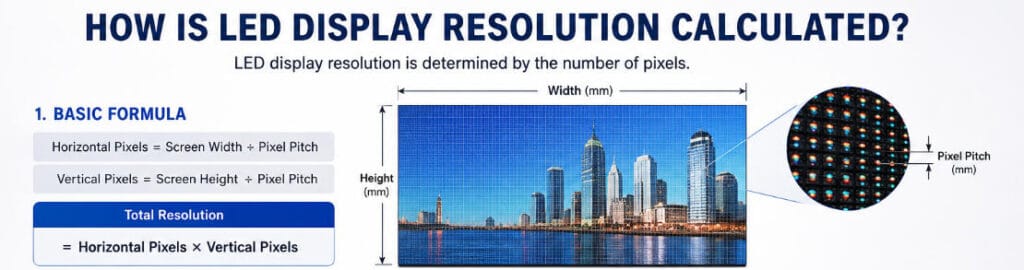
2. The Basic Formula for Calculating LED Display Resolution
The basic calculation is straightforward.
Horizontal Resolution
Horizontal Pixels = Screen Width ÷ Pixel Pitch
Vertical Resolution
Vertical Pixels = Screen Height ÷ Pixel Pitch
The units must be consistent.
For example, if screen dimensions are measured in millimeters, pixel pitch must also be measured in millimeters.
The final LED display resolution is:
Horizontal Pixels × Vertical Pixels
Example
Assume an LED display has:
- Width: 6,000 mm
- Height: 3,375 mm
- Pixel pitch: 3 mm
Horizontal resolution:
6,000 ÷ 3 = 2,000 pixels
Vertical resolution:
3,375 ÷ 3 = 1,125 pixels
The theoretical resolution is therefore:
2,000 × 1,125 pixels
Total pixel count:
2,000 × 1,125 = 2,250,000 pixels
In practice, however, the final resolution must also match the actual LED module and cabinet structure. This is an important distinction because a mathematically calculated size may not always be physically achievable using the selected cabinet dimensions.
3. What Is Pixel Pitch and Why Does It Affect Resolution?
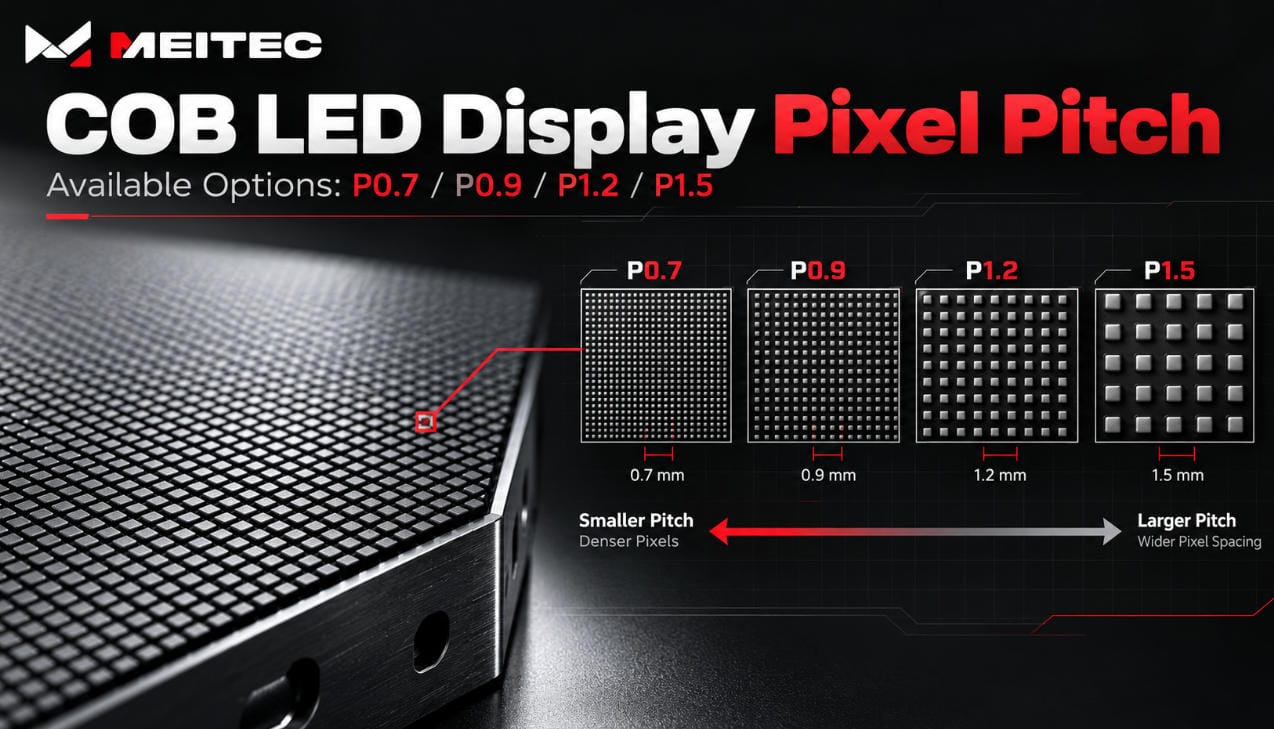
Pixel pitch is the center-to-center distance between adjacent pixels. It is normally measured in millimeters.
For example:
- P1.25 = 1.25 mm pixel pitch
- P2.5 = 2.5 mm pixel pitch
- P4 = 4 mm pixel pitch
- P10 = 10 mm pixel pitch
A smaller pixel pitch places more pixels within the same physical area.
Therefore:
Smaller Pixel Pitch → Higher Pixel Density → Higher Resolution at the Same Screen Size
For example, consider two LED displays with the same physical size.
A 6 m × 3 m screen using P3 has approximately:
2,000 × 1,000 pixels
A 6 m × 3 m screen using P1.5 has approximately:
4,000 × 2,000 pixels
The P1.5 display contains approximately four times as many pixels as the P3 display over the same physical area.
This does not mean that the smaller pixel pitch is always the better choice. Pixel pitch should be selected according to viewing distance, content requirements, application environment, budget, and required information density.
For close-viewing applications such as control rooms, meeting rooms, studios, and command centers, fine-pitch products may provide a higher level of detail. For large outdoor advertising screens viewed from longer distances, a larger pixel pitch may be more appropriate.
For related product options, Meitec provides Fine Pitch LED Displays designed for applications where higher pixel density and closer viewing distances are required.
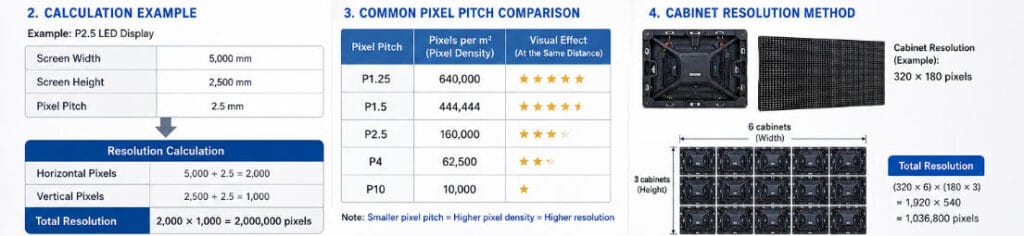
4. How to Calculate Resolution from Pixel Pitch and Screen Size
The most common method is to convert the physical screen dimensions into pixels.
The formula is:
Resolution Width = Screen Width (mm) ÷ Pixel Pitch (mm)
Resolution Height = Screen Height (mm) ÷ Pixel Pitch (mm)
Example: P2.5 LED Display
Suppose the screen measures:
- Width: 5,000 mm
- Height: 2,500 mm
- Pixel pitch: 2.5 mm
Horizontal pixels:
5,000 ÷ 2.5 = 2,000 pixels
Vertical pixels:
2,500 ÷ 2.5 = 1,000 pixels
The resolution is:
2,000 × 1,000 pixels
Total pixels:
2,000,000 pixels
This calculation is useful during early project planning because it provides a quick estimate of the available pixel capacity.
However, actual LED displays are constructed from modules and cabinets with fixed pixel configurations. Therefore, the final screen size may need to be adjusted to match the cabinet structure.
5. LED Cabinet Resolution: The More Practical Calculation Method
For an actual LED project, resolution is often calculated using cabinet resolution.
Every LED cabinet contains a fixed number of pixels.
For example, a cabinet may have a resolution of:
320 × 180 pixels
If the final LED wall uses:
- 6 cabinets horizontally
- 3 cabinets vertically
The complete screen resolution is:
Horizontal:
320 × 6 = 1,920 pixels
Vertical:
180 × 3 = 540 pixels
Final resolution:
1,920 × 540 pixels
This method is particularly useful because it reflects the actual physical configuration of the LED wall.
The general formula is:
Horizontal Resolution
Cabinet Horizontal Pixels × Number of Cabinets Horizontally
Vertical Resolution
Cabinet Vertical Pixels × Number of Cabinets Vertically
Therefore:
Total Resolution = (Cabinet X Resolution × Horizontal Quantity) × (Cabinet Y Resolution × Vertical Quantity)
This approach should generally be used when designing a real project because it avoids situations where a theoretical screen size cannot be achieved using the selected cabinet dimensions.
6. Example: Calculating a 4K LED Display
A common project requirement is to create an LED display capable of supporting 4K content.
The standard UHD 4K resolution is:
3840 × 2160 pixels
To achieve this exact pixel resolution, the LED display must contain:
- 3,840 horizontal pixels
- 2,160 vertical pixels
The physical screen size depends on pixel pitch.
Using P2.5
Width:
3,840 × 2.5 mm = 9,600 mm
Height:
2,160 × 2.5 mm = 5,400 mm
The theoretical physical size is:
9.6 m × 5.4 m
Using P1.5
Width:
3,840 × 1.5 mm = 5,760 mm
Height:
2,160 × 1.5 mm = 3,240 mm
The theoretical physical size becomes:
5.76 m × 3.24 m
The same 4K resolution can therefore be achieved with very different physical dimensions.
This illustrates an important principle:
Resolution and screen size are not the same thing. Pixel pitch determines how many physical pixels fit into a given area.
A smaller pitch can achieve high resolution within a smaller physical display area.
7. How to Calculate Total Pixel Count
The total number of pixels is calculated by multiplying horizontal and vertical resolution.
Total Pixels = Horizontal Resolution × Vertical Resolution
For example:
1920 × 1080 = 2,073,600 pixels
This number is important because total pixel count affects several aspects of an LED display system, including:
- Receiving card capacity
- Controller selection
- Video processor requirements
- Data transmission capacity
- System configuration
- Potential system cost
A larger physical screen does not automatically require more processing capacity. A large P10 outdoor screen may contain fewer pixels than a much smaller P1.5 indoor LED wall.
For this reason, system design should be based on actual pixel count rather than physical area alone.

8. How Is LED Pixel Density Calculated?
Pixel density describes how many pixels are contained within one square meter of an LED display.
The approximate formula is:
Pixel Density = 1,000,000 ÷ (Pixel Pitch²)
when pixel pitch is measured in millimeters.
Example: P2.5
1,000,000 ÷ (2.5 × 2.5)
= 160,000 pixels per square meter
Example: P1.25
1,000,000 ÷ (1.25 × 1.25)
= 640,000 pixels per square meter
This explains why reducing pixel pitch has a significant effect on resolution.
If pixel pitch is reduced by half, pixel density increases by approximately four times.
For example:
- P4 = approximately 62,500 pixels/m²
- P2 = approximately 250,000 pixels/m²
The relationship is not linear because pixel density is based on two dimensions: horizontal and vertical spacing.
9. Screen Resolution vs. Content Resolution
One common mistake is assuming that an LED screen must have exactly the same resolution as the content being displayed.
This is not always necessary.
For example, a video source may be:
1920 × 1080
while the physical LED screen resolution may be:
1920 × 960
or:
2048 × 1152
A video processor or controller can scale the input signal to the physical LED display resolution.
However, scaling should be carefully considered.
If the source content and screen resolution have significantly different aspect ratios, the image may require:
- Cropping
- Letterboxing
- Stretching
- Custom content formatting
For the best visual result, the LED wall should ideally be designed around the intended content format.
This is particularly important for:
- Control rooms
- Corporate presentation displays
- Broadcast environments
- Virtual production
- Retail media
- Digital advertising networks
Before selecting a display resolution, the project team should identify the expected input sources and determine whether standard formats such as Full HD or UHD are required.
10. The Importance of Aspect Ratio
Aspect ratio describes the proportional relationship between screen width and height.
A standard 16:9 display follows this relationship:
16 ÷ 9 = 1.777…
Examples include:
- 1920 × 1080
- 3840 × 2160
- 1280 × 720
LED displays do not have to use standard aspect ratios. They can be designed as:
- Ultra-wide displays
- Square displays
- Vertical displays
- Curved displays
- Custom-shaped displays
However, the content strategy should be considered before finalizing the physical dimensions.
A custom LED display may have excellent pixel density but still require custom video formatting if its aspect ratio does not match the available content.
Therefore, resolution planning should consider both:
Pixel Count + Screen Proportion
rather than resolution alone.
11. Why the Highest Resolution Is Not Always the Best Choice
Increasing resolution usually requires a smaller pixel pitch or a larger number of pixels.
This can increase:
- Product cost
- Data capacity requirements
- Control system requirements
- Power and system complexity
- Installation precision requirements
More importantly, viewers may not always benefit from additional pixel density.
If an outdoor LED billboard is viewed primarily from 50 meters away, an extremely fine pixel pitch may provide little visible advantage compared with a properly selected larger pitch.
On the other hand, a control room display viewed from only a few meters away may require a much higher pixel density to display maps, dashboards, text, and multiple information windows clearly.
This is why resolution should be evaluated together with viewing distance.
Meitec’s LED display selection process should therefore start with the application environment, required screen dimensions, audience position, and content requirements—not simply with a request for the smallest available pixel pitch. Meitec offers COB LED Displays and other display technologies for applications where fine pixel pitch and high information density are important.
12. A Practical LED Resolution Calculation Workflow
For most projects, LED display resolution can be planned using the following sequence.
Step 1: Define the Required Content
Identify the main signal formats:
- 1080p
- 4K
- Custom resolution
- Multiple input windows
- Digital signage content
Step 2: Determine the Screen Dimensions
Define the available installation width and height.
Physical limitations may include:
- Wall dimensions
- Structural conditions
- Viewing area
- Installation access
- Cabinet size
Step 3: Evaluate Viewing Distance
Determine the closest practical viewing distance and the main audience position.
This helps establish a reasonable pixel pitch range.
Step 4: Select the Pixel Pitch
Choose the pitch according to:
- Viewing distance
- Required image detail
- Screen size
- Content type
- Application
- Budget
Step 5: Check Cabinet Resolution
Confirm the pixel resolution of the selected cabinet.
Step 6: Calculate Cabinet Quantity
Determine the number of cabinets required horizontally and vertically.
Step 7: Calculate Final Screen Resolution
Multiply cabinet resolution by cabinet quantity.
Step 8: Confirm System Compatibility
Check whether the total pixel count is compatible with the selected:
- LED controller
- Receiving cards
- Video processor
- Input system
This process produces a practical configuration rather than a purely theoretical resolution calculation.
13. Common Questions About LED Display Resolution
Is LED display resolution determined by screen size?
No. Screen size only determines the physical dimensions. Resolution depends on the number of pixels contained within that area.
A smaller screen can have a higher resolution than a larger screen if it uses a finer pixel pitch.
Does a smaller pixel pitch always mean better image quality?
Not necessarily.
A smaller pixel pitch increases pixel density, but the visible benefit depends on viewing distance, content, brightness, processing, calibration, and application requirements.
Can an LED display have 4K resolution?
Yes. An LED display can be configured to provide 3840 × 2160 pixels or other 4K-class resolutions. The physical size required depends on the selected pixel pitch.
How do I calculate the resolution of an LED cabinet?
Use the number of pixels contained horizontally and vertically within the cabinet.
For example:
320 × 180 = 57,600 pixels per cabinet
The total wall resolution is then calculated by multiplying cabinet resolution by the number of cabinets.
Is a higher pixel count always necessary?
No. The required resolution should match the viewing distance and content requirements. Excessively high resolution can increase project cost without delivering a meaningful visual improvement.
Conclusion
LED display resolution is calculated by determining how many physical pixels are present horizontally and vertically.
The most basic formula is:
Horizontal Resolution = Screen Width ÷ Pixel Pitch
Vertical Resolution = Screen Height ÷ Pixel Pitch
For actual projects, cabinet resolution and cabinet quantity should also be considered because LED displays are assembled from modules and cabinets with fixed pixel structures.
The key relationship is straightforward:
Screen Size + Pixel Pitch = Available Resolution
But selecting the correct resolution requires more than mathematical calculation. Viewing distance, content format, aspect ratio, pixel density, cabinet configuration, and control system capacity should all be evaluated together.
For project-specific planning, Meitec provides LED display solutions across COB, rental, creative, indoor, and outdoor applications. Explore the full range of Meitec LED Display Solutions to compare display technologies and configurations according to the actual requirements of each project.