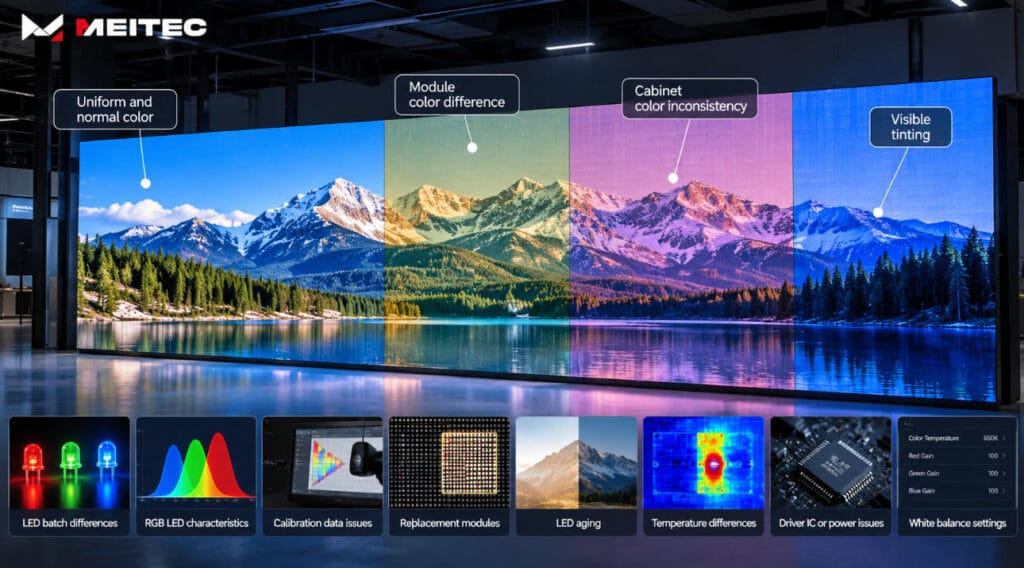
Color differences on an LED display usually appear as areas that look slightly red, green, blue, yellow, darker, or brighter than the surrounding screen. In some cases, the difference is visible between individual pixels; in others, an entire module or cabinet appears to have a different color tone.
This problem is generally described as LED display color inconsistency or poor color uniformity.
A certain amount of variation exists naturally because an LED screen is assembled from thousands or millions of red, green, and blue LEDs. However, obvious color patches or cabinet boundaries are not normal for a properly manufactured, configured, and calibrated professional LED display.
The cause may come from LED manufacturing tolerances, different production batches, calibration data, aging, temperature, driver electronics, replacement modules, or configuration errors.
Understanding which type of difference is visible is the first step toward correcting it.
What Does “Color Difference” Mean on an LED Display?
A full-color LED pixel normally contains red, green, and blue light-emitting components.
By controlling the output of these three channels, the display produces different colors. Ideally, pixels receiving the same image signal should produce nearly identical optical output.
In practice, small differences exist.
For example, two pixels receiving the same white signal may not produce exactly the same RGB balance. One may appear slightly warmer, while another appears slightly cooler.
When these differences remain small and well controlled, viewers normally cannot notice them. When the variation becomes large enough, the display may show:
- color patches;
- inconsistent white areas;
- visible module boundaries;
- cabinets with different color tones;
- red, green, or blue tinting;
- uneven low-grayscale images;
- replacement modules that stand out from the rest of the screen.
Color uniformity therefore depends on more than simply displaying the correct video signal.
The optical performance of the LEDs, electronics, calibration data, operating conditions, and aging history all influence the final result.
1. Differences Between LED Production Batches
One of the most common causes of LED display color differences is variation between LED batches.
LEDs are semiconductor devices. Even when they have the same nominal model and specifications, their actual optical characteristics are not perfectly identical.
Manufacturers therefore classify LEDs according to parameters such as:
- luminous intensity;
- dominant wavelength;
- color coordinates;
- forward voltage.
This classification is commonly called LED binning.
Using closely matched LEDs helps improve consistency across a screen. However, modules manufactured from different LED batches may still show visible differences when installed next to each other.
This is particularly noticeable on:
- full-white screens;
- light gray backgrounds;
- solid red, green, or blue test patterns;
- low-brightness content.
For this reason, mixing modules from substantially different production batches should be avoided whenever high color uniformity is required.
2. Differences in RGB LED Characteristics
A color difference does not necessarily mean that all three channels are incorrect.
Sometimes only one color component has changed.
For example, if the blue LEDs in one area produce slightly less output than surrounding pixels, white content may appear warmer or more yellow. If the red output is excessive, the same area may show a reddish tint.
The relationship can be simplified as:
Displayed Color = Red Output + Green Output + Blue Output
Any imbalance among these channels changes the resulting color.
This is why a screen can have relatively uniform overall brightness but still show visible color differences.
Brightness uniformity and color uniformity are related, but they are not the same measurement.
3. Incorrect or Missing Calibration Data
Professional LED displays often use calibration coefficients to compensate for natural variations between pixels or modules.
During calibration, the actual brightness and color output of the display is measured. Correction coefficients are then calculated so that stronger pixels can be reduced and RGB output can be adjusted toward a common target.
If calibration data is incorrect, missing, overwritten, or applied inconsistently, visible color differences can appear.
Typical situations include:
- receiving-card replacement;
- module replacement;
- incorrect configuration files;
- lost calibration coefficients;
- controller reset;
- copying configuration from the wrong cabinet;
- mixing calibrated and uncalibrated modules.
Calibration does not make every LED physically identical. Instead, it compensates electronically for reasonable differences in their optical output.
For a detailed explanation of the measurement and correction process, see Meitec’s LED display calibration guide.
4. Replacement Modules Can Have a Different Color
A newly installed LED module often looks different from modules that have already been operating for several years.
This does not automatically mean that the replacement module is defective.
The new module may have:
- LEDs from a different production batch;
- higher remaining brightness;
- different calibration coefficients;
- a different aging history;
- slightly different optical characteristics.
The surrounding modules may already have accumulated thousands of operating hours.
As LEDs age, their luminous output changes gradually. Red, green, and blue LEDs may also degrade at different rates.
Consequently, installing a completely new module into an older screen can create an obvious rectangular area that appears brighter or has a different white balance.
Keeping spare modules from the original production batch is therefore useful for installations where long-term uniformity is important.
After replacement, recalibration may also be required.
5. Uneven LED Aging
LED brightness gradually decreases with operating time.
However, degradation is not always perfectly uniform.
Different areas of a screen may experience different:
- operating hours;
- brightness settings;
- temperatures;
- content patterns;
- environmental conditions.
For example, if part of a display regularly shows bright static content while another area usually displays darker images, their long-term operating conditions may differ.
RGB components can also age at different rates.
The result may be gradual changes in white balance or color uniformity even when the display originally left the factory with good consistency.
This type of color difference normally develops over time rather than appearing suddenly.
6. Temperature Differences Across the Screen
LED optical characteristics change with temperature.
A display operating in an uneven thermal environment may therefore show temporary or long-term color variation.
Temperature differences may result from:
- direct sunlight on only part of an outdoor screen;
- insufficient ventilation;
- blocked airflow;
- cabinet heat accumulation;
- nearby heat sources;
- cooling-system differences.
Outdoor LED displays are particularly exposed to changing environmental conditions.
One section may receive direct afternoon sunlight while another remains shaded. The operating temperature of the LEDs and electronic components can consequently differ.
If the color difference becomes stronger as the screen heats up and decreases after cooling, thermal conditions should be investigated before assuming that calibration alone will solve the problem.
For demanding outdoor installations, product design, heat management, module monitoring, and maintenance accessibility should all be considered. Meitec’s MTO Pro outdoor LED display provides an example of a modular outdoor system incorporating monitoring and correction-data-related functions. [Internal Link 2]
7. Driver IC and Electrical Differences
LED color output also depends on the electronics driving the LEDs.
Driver ICs regulate the current and timing used to control pixel brightness.
Problems with the driver circuit can cause:
- abnormal RGB output;
- brightness differences;
- rows or columns with different colors;
- unstable grayscale;
- localized color distortion.
Power-supply problems can produce similar symptoms.
If voltage is unstable or electrical connections have excessive resistance, the affected module may not operate in the same way as surrounding modules.
Unlike normal batch variation, electrical faults often create more structured patterns such as an abnormal row, column, module, or cabinet.
This pattern can help technicians distinguish a hardware problem from general color-uniformity variation.
8. Low-Grayscale Color Inconsistency
Some LED displays appear reasonably uniform at high brightness but show color patches when displaying dark gray images.
This is generally a more demanding operating condition.
At low brightness, small differences in:
- driver IC performance;
- PWM behavior;
- RGB channel response;
- calibration accuracy;
- LED characteristics
become more visible.
For applications such as control rooms, studios, conference rooms, virtual production, and premium indoor displays, low-grayscale performance can therefore be more important than simply evaluating a screen at maximum brightness.
A display that looks uniform on a full-white test image should also be evaluated using dark gray and low-brightness test patterns.
9. White-Balance or Color-Temperature Settings
Sometimes the LEDs themselves are functioning normally, but different sections of the display are operating with different RGB or white-balance settings.
White is created by combining red, green, and blue output.
Changing their relative proportions changes the perceived color temperature.
A higher blue contribution generally produces a cooler-looking white, while relatively stronger red output produces a warmer-looking white.
If different cabinets or display sections use inconsistent color-temperature settings, the boundaries may become visible even though the hardware is healthy.
Before replacing modules, technicians should therefore verify that the complete screen is using consistent:
- brightness settings;
- RGB gain values;
- color-temperature settings;
- receiving-card parameters;
- calibration coefficients.
10. Differences Between Cabinets
A large LED wall consists of multiple modules and cabinets.
If complete cabinets appear different from each other, technicians should consider cabinet-level causes before inspecting individual LEDs.
Possible causes include:
- cabinets from different production batches;
- different receiving-card configurations;
- different calibration data;
- different operating histories;
- replacement cabinets;
- temperature differences;
- inconsistent brightness settings.
A visible rectangular boundary that exactly matches a cabinet usually provides an important diagnostic clue.
Likewise, a rectangular difference matching one LED module points toward module-level factors.
The shape of the abnormal area often helps identify where the problem originates.
How Can You Diagnose LED Display Color Differences?
Troubleshooting should begin with controlled test content rather than normal video.
Display several test patterns:
- full white;
- full red;
- full green;
- full blue;
- medium gray;
- low gray;
- grayscale gradients.
Then observe the shape and behavior of the abnormal area.
If one individual pixel has the wrong color
Check the LED package, soldering, driver circuit, and pixel condition.
If one module has a different color
Check the module batch, operating age, calibration coefficients, power connection, configuration, and whether the module was recently replaced.
If one cabinet looks different
Check receiving-card parameters, calibration data, cabinet batch, power conditions, and operating history.
If large irregular areas change with temperature
Investigate ventilation, thermal conditions, sunlight, and cooling.
If the entire display has an incorrect color tone
Check input signals, processor settings, global RGB balance, color temperature, and display configuration.
This method is generally more useful than immediately performing calibration without first determining the type of problem.
Can LED Display Calibration Fix Color Differences?
Calibration can correct many color-uniformity problems, but not all of them.
It is effective when differences are caused by reasonable variation in:
- LED brightness;
- RGB output;
- production tolerances;
- aging;
- replacement modules.
The calibration system measures the optical output and applies correction coefficients so the pixels move toward a common target.
Meitec’s MTCOB Pro Series, for example, uses pixel color calibration technology intended to independently correct LED pixels and improve overall color consistency.
However, calibration cannot repair physical hardware faults.
It cannot properly compensate for:
- dead LEDs;
- severely degraded LEDs;
- damaged driver ICs;
- unstable power supplies;
- incorrect wiring;
- defective receiving cards;
- LEDs whose remaining output is below the required correction range.
Hardware faults should be repaired first. Calibration should then be used to optimize the uniformity of the functioning display.
Factory Calibration vs. On-Site Recalibration
Factory calibration establishes initial consistency before an LED display is delivered.
It is normally performed under controlled measurement conditions and is particularly useful for matching modules and cabinets from a new production batch.
On-site recalibration serves a different purpose.
It may become necessary after:
- long-term operation;
- module replacement;
- cabinet replacement;
- major maintenance;
- visible aging;
- relocation of rental cabinets;
- mixing units with different operating hours.
Neither method replaces proper component matching.
The strongest approach combines consistent production, controlled LED selection, factory calibration, suitable spare-parts planning, correct configuration, and recalibration when actual operating conditions require it.
How Can Color Differences Be Reduced During the Life of an LED Display?
Long-term color consistency starts before installation.
For projects where uniformity is particularly important, good practice includes:
- using modules from controlled LED batches;
- completing factory brightness and color calibration;
- storing calibration coefficients correctly;
- retaining matching spare modules;
- avoiding unnecessary mixing of different module generations;
- maintaining adequate ventilation;
- operating the display at appropriate brightness rather than permanently at maximum output;
- recording module and cabinet replacements;
- checking calibration after major maintenance;
- periodically inspecting solid-color and grayscale test patterns.
Procurement quality is therefore important as well as maintenance quality.
An LED display is a system rather than simply a collection of LED modules. Component consistency, driver electronics, control architecture, calibration, environmental conditions, and maintenance history all contribute to the color uniformity viewers eventually see.
For an overview of Meitec’s LED display technologies and product families, visit the Meitec LED display solutions page.
Does a Color Difference Always Mean the LED Screen Is Defective?
No.
Small color differences can result from normal component tolerances or aging and may be correctable through calibration.
The key question is the magnitude and cause of the difference.
A slightly mismatched replacement module may simply need appropriate calibration. A complete row that suddenly turns green, however, is more likely to indicate an electronic or signal-related problem.
Likewise, a screen that gradually becomes less uniform after years of operation should not be diagnosed in the same way as a newly installed display showing obvious cabinet boundaries from day one.
The visual pattern, operating history, and measurement results should be considered together.
Conclusion
LED display color differences occur when pixels, modules, or cabinets no longer produce sufficiently consistent RGB output.
The most common causes include LED manufacturing variation, different production batches, incorrect calibration data, replacement modules, uneven aging, temperature differences, driver electronics, power conditions, and inconsistent display settings.
Calibration can correct many reasonable brightness and color variations, but it cannot repair defective hardware or fully compensate for severely degraded LEDs.
For professional LED displays, good color uniformity therefore depends on the complete lifecycle of the screen: component selection, manufacturing consistency, factory calibration, configuration, thermal design, spare-module management, maintenance, and recalibration.
When a color difference appears, identifying its physical pattern and operating history before making adjustments usually leads to a faster and more accurate diagnosis.